Failure to deploy patches properly and in a timely manner can render information technology assets vulnerable to cyberattacks and cause latency in system processes.
Why are Software Patches Important?
Here are the common IT and cybersecurity issues that can be addressed by software patches.
• Vulnerability to malware infection
Malware can spread due to outdated security measures. Patches keep security measures up to date and able to protect against new threats such as the costly, even potentially life-threatening, ransomware that still continues to plague companies.
• Unauthorized access and data breach
New security measures to IT infrastructure can be deployed by IT professionals through patches. Such security measures can help prevent hacking or unauthorized access to proprietary information and even allow the “remote wipe” of information on compromised devices if needed.
• Latency and unscheduled downtimes
Failure to deploy and implement patches can impact the performance of devices and systems. Also, the unplanned and unscheduled application of patches can lead to operational downtimes, which, in turn, lead to avoidable costs.
What to Include in a Patch Management Checklist
A patch management checklist should include the following key items to ensure that your organization can systematically manage software updates, reducing vulnerabilities and maintain a smooth deployment of patches:
Maintain an Up-to-Date Asset Inventory
Regularly update and verify your inventory of all IT assets, including servers, workstations, network devices, and software applications.
Use automated tools for asset discovery to ensure no systems are overlooked.
Audit and Review Patch Management Policy
Periodically review your patch management policy to ensure it aligns with business and security objectives.
Document roles, responsibilities, and procedures for patch deployment.
Identify and Assess Vulnerabilities
Use vulnerability scanners or RMM tools to detect missing patches and unpatched vulnerabilities across your environment.
Assess the risk associated with each vulnerability to prioritize patching efforts.
Update Patch Database
Keep your patch database current with the latest vendor releases, including security and non-security patches.
Define Patch Exclusions and Exceptions
Establish criteria for excluding certain patches (e.g., legacy systems, accepted risks) and document the rationale for each exception.
Develop and Test a Rollback Plan
Prepare a rollback or disaster recovery plan in case a patch causes issues, ensuring you can revert to a stable state quickly.
Test Patches Before Full Deployment
Test patches in a controlled environment or on a subset of devices to identify potential issues before organization-wide rollout.
Schedule Maintenance Windows
Plan patch deployments during off-peak hours to minimize business disruption.
Communicate with Stakeholders
Notify end users and stakeholders about planned patching activities, expected impacts, and completion of maintenance.
Deploy Patches
Roll out patches according to the defined schedule and policy, using automation where possible to streamline the process.
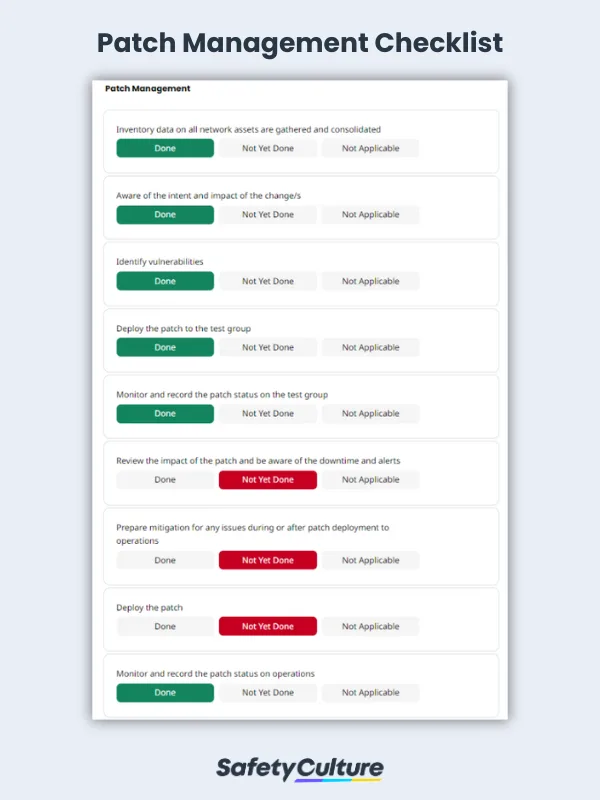
Patch Management Checklist Sample Report | Mitti (by SafetyCulture)
Tips Before, During, and After Deploying a Patch
Patches intend to improve and fix deficiencies or address security vulnerabilities of software and operating systems. Here are some tips to ensure that patches do their job properly and do not negatively impact systems upon deployment.
Before Deployment Create a patch management plan that considers contingencies in case the patch deployment goes awry. Be aware of current vulnerabilities and cybersecurity issues faced by the organization in order to realize the corresponding solution. Create a patch management checklist and conduct patch testing for a batch of devices with different operating systems to ensure that the intended goal is consistent. Watch out for any unwanted effects of the patch during testing. Record all observations and use the settings information as a reference when deploying the patch to operations.
During Deployment Once patch testing is completed and the intended effect is achieved, consider scheduling the deployment of a patch or, in case of urgent issues that need to be addressed immediately, decide if an immediate patch deployment is ideal. It is advisable to deploy a patch during off-peak hours to minimize interruption to normal business operations. Record the exact time and date and note observations during deployment so it’s easier to find solutions when issues arise.
After Deployment Continue to monitor and observe the impact of a patch after deployment and see if the intended effect remains aligned with expectations. Maintain accurate and updated records of all patch deployment activities for future reference.