Mitti by SafetyCulture
Pricing
Log inSign up for free
  1. Home
  2. Checklist guides
  3. Operations
  1. Home
  2. Checklist guides
  3. Operations
Mitti by SafetyCulture

The way the world works

Follow us

App Store
Google Play

Product

  • Pricing
  • Book a demo
  • Product updates
  • Mitti (by SafetyCulture)

Support

  • Help center
  • Contact us
  • API developer documentation
  • Digitize your checklist

Resources

  • Content library
  • App & software guides
  • Checklist guides
  • Topic guides
  • eBooks
  • Blog

Company

  • About
  • Careers
  • News room
  • Meet the leadership team
  • Events & webinars
Copyright © 2026 Mitti
StatusLegalPrivacyTerms & ConditionsSecurity

SafetyCulture has a new name. Say hello to Mitti. Learn More.

Powered by

Conference Room Equipment Checklist

Avoid equipment malfunction and shortage to ensure conference room functionality

Rated 4.6/5 stars on Capterra | 3k+ app store reviews
Use templatePreview template
Digital Conference Room Equipment Checklists
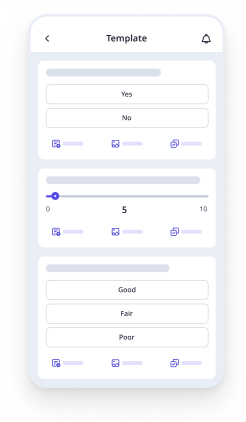
Mobile Preview
See the template in action (opens in new tab)

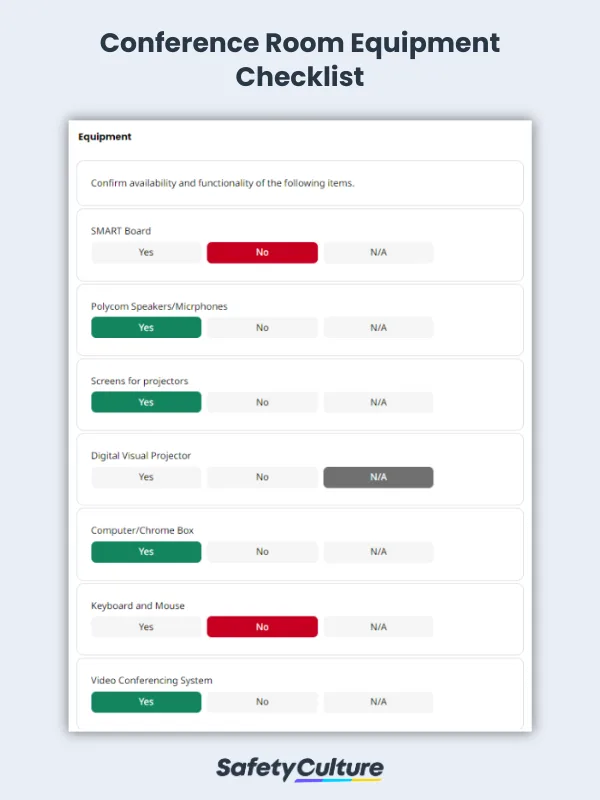
Meeting organizers and persons in charge can use this conference room equipment checklist to ensure that all facilities, tools, and materials are available and functional for the purpose of a scheduled meeting. This template can also be used to confirm that the electrical power in the room is sufficient, if contingency plans are in place in case of equipment malfunction, if any additional costs will be incurred. This checklist includes checking some of the following equipment:

  • SMART board

  • Polycom speakers/microphones

  • Digital projectors

  • Chrome box

  • Video conferencing system

  • Auxiliary equipment such as laser points

  • Adequate lighting

Note: This template is customizable. Equipment being checked can be replaced with those that are present in your meeting room.

Digital Conference Room Equipment Checklists
Mobile Preview
See the template in action (opens in new tab)

Why Mitti digital checklists?

  • Free to use for up to 10 users

  • Eliminate paperwork with digital checklists

  • Generate reports from completed checklists

Use template
  • What is a Conference Room Equipment Checklist?
  • What are Common Conference Room Equipments?
  • What To Include in a Conference Room Equipment Checklist
  • 3 Reasons to Use a Digital Conference Room Equipment Checklist

In this article

  • What is a Conference Room Equipment Checklist?
  • What are Common Conference Room Equipments?
  • What To Include in a Conference Room Equipment Checklist
  • 3 Reasons to Use a Digital Conference Room Equipment Checklist

Eliminate paperwork with digital checklists

Skip the setup and get to work in seconds.

Use template

Article by

Jona Tarlengco

|

3 min read

|

8 Mar 2024

What is a Conference Room Equipment Checklist?

A conference room equipment checklist is a tool used by conference or meeting room organizers to ensure that all appliances, materials, and fixtures needed for a scheduled function is available and ready for use. Using a checklist as part of the SOP when preparing conference rooms can minimize setbacks such as equipment malfunction, as well as missing or lacking items and equipment.

What are Common Conference Room Equipments?

When preparing for a business meeting or presentation, it is important to make sure you have all the necessary equipment for a successful conference. Some of the most important conference room equipment are:

  • Tables and chairs

  • A projector, screen

  • A laptop or computer set up

  • A projector with a screen

  • Microphones, if necessary

  • Extension cords

If you are presenting remotely, be sure to test all equipment beforehand to ensure a smooth meeting. By taking a little time to prepare for your conference, you can ensure that everything goes smoothly and that you make a positive impression on your colleagues and clients. Additionally, depending on the nature of the conference, you can also consider bringing note-taking materials, a water bottle, and snacks.

To ensure you have everything you need, consider creating and managing a checklist for your conference room equipment. Having a checklist of what to bring can help to ensure you don’t forget anything important. This way, you can make sure that you have everything you need to present your ideas and proposals in a professional setting, as well as address any issues with your equipment before starting the conference.

What To Include in a Conference Room Equipment Checklist

When it comes to conference room equipment, there are a few key items that should be on every checklist. First, it should take into consideration what are the equipment present or necessary in the conference room. This includes but is not limited to:

  • The conference room’s audio, lighting, and video equipment

  • The internet connection of the room

  • The working condition of all equipment

3 Reasons to Use a Digital Conference Room Equipment Checklist

Assuming that routine tasks are mistake-proof due to repetition makes it vulnerable to human error. Below are some of the benefits of using a digital checklist for conference room preparation.

  • It helps with productivity and time management Starting a meeting and finding out that certain equipment, materials, or tools such as whiteboard, microphone, projector, conference table, and webcam are missing or broken negatively affects the team’s productivity. Idly sitting by waiting for the organizer to scramble for the necessary items is a waste of everyone’s time. Using a checklist can help prevent this problem so physical or online meetings can proceed without a hitch.

  • It safeguards from memory lapses Thinking about the possibility of missing or forgetting something important can be stressful for the organizer. No matter how routine the task, the occasional memory lapse may still happen. A dedicated checklist can take the pressure off of organizers from having to memorize every essential detail and specification.

  • It motivates punctuality regarding deadlines Ticking tasks off of a checklist has been proven to trigger a dopamine surge in our brains. Eventually, the motivation to complete tasks self-perpetuate with the accomplishment of each new item on the checklist, resulting in the organizer being more likely to finish preparations on time, if not early.

Content library templates

Still looking for a checklist?

Search, filter, and customize 60,000+ templates across industries and use cases.

Browse Library
JT

Article by

Jona Tarlengco

Mitti (by SafetyCulture) Content Specialist

View author profile

Related resources you might like

Templates

Powered by

Conference Room Booking Template

Meeting and conference organizers can use this conference room booking template to schedule meetings and reserve conference rooms. Provide employee name, staff ID, room to reserve, and a short description of the meeting and conference purpose.

View template in library

Articles

Recreation Management Software

Explore top recreation management software to streamline operations, enhance user experience, and simplify managing recreational activities.

Learn more

Transportation and Logistics: What’s the Difference?

Learn about the importance of transport and logistics within the supply chain and how it is used in business operations.

Learn more

Project Handover Template

Download and use free project handover templates to ensure efficient communication and turnovers across various project stakeholders.

Learn more