What is an End of Shift Report?
An end-of-shift report is a document outlining vital information about a worker’s shift. Employees and supervisors often use an end-of-shift form to communicate all completed and ongoing tasks and provide a heads-up regarding issues encountered during the shift. Using this document, they can update the next person who will take over about safety, quality, and other things to watch out for during their shift, ensuring a smooth task turnover. An end-of-shift report is ideal for industries required to complete specific tasks on a daily basis, such as frontline workers in retail, healthcare, manufacturing, and hospitality.
Purpose
An end-of-shift or EOS report plays an important role in ensuring efficient operations and transitions from one employee to the next. It serves two purposes: reporting and problem-solving.
Sometimes called an end-of-day or EOD report, this document primarily functions as a communication tool that informs managers about the day-to-day happenings on their employees’ shifts. This report helps bridge information gaps among teams, especially employees handing things over to the next shift, and ensures everyone is on the same page about their shared goals.
Moreover, an EOS report also helps teams resolve problems in their daily operations. Clear handovers matter most in shift-based work, where fatigue and schedule changes are already a recognized risk factor to operations and safety according to the US National Institute for Occupational Safety and Health (NIOSH) guidance on shift work. By giving workers a platform to document issues, they feel empowered to raise and address them effectively with the help of the right personnel. This record also provides insights to help management prevent them from recurring over and over.
Elements
Before drafting an end-of-shift report, it’s essential to know its key components first. Every report should contain the following elements:
Employee information
The first section of an end-of-shift report outlines basic details about the employee who filled out the form. This information is vital for tracking individual performance and instilling accountability among team members.
Listed below are essential details to include in your EOS report:
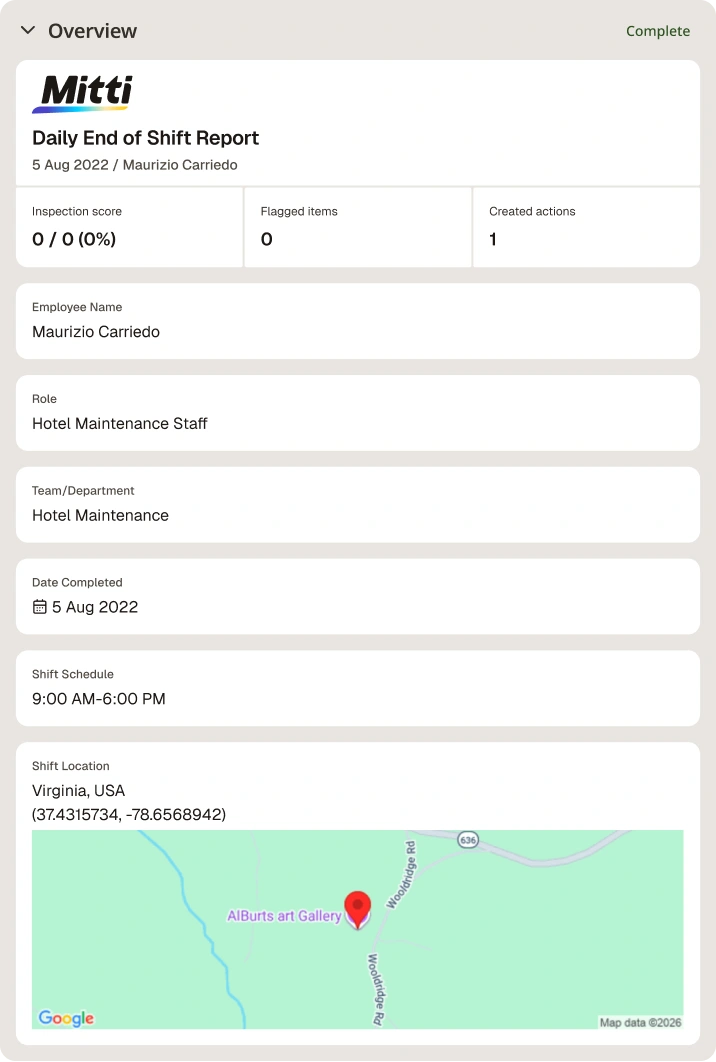
Employee name: Who was the person assigned for the shift?
Shift schedule: When does the employee’s shift start and end?
Date completed: When and what time did they fill out the form?
Location: Where did they work during their shift (e.g., on-site, remote)?
Tasks and responsibilities
After filling out necessary employee information, the next step is to list your assigned jobs for the day. This section summarizes what happened during the day and provides a run-through of tasks and status by the end of the shift. In doing so, managers can monitor the progress of tasks assigned to their employees and stay on track with their business goals.
Task status often varies from one workplace to another. The ones listed below are the basics to help you get started:
Not started
Ongoing/In progress
Pending/On hold
For approval/Awaiting approval
Completed/Accomplished
Problems and issues encountered
You'll inevitably run into hurdles during your shift, from faulty equipment to safety protocol violations. Documenting these issues also supports compliance with OSHA's recordkeeping and reporting requirements for workplace injuries and illnesses. Whether small or big, report these incidents in your end-of-shift report with templated forms to describe what you saw, and attach photos or videos to back it up.
Action items
Get ahead of the issue by listing solutions to address what you raised above. Note specific actions to resolve the problem, and assign them to the right person for a quicker turnaround.
Handover notes
If your team works multiple shifts, a handover section is essential. Use it to add assignments and reminders for whoever's taking over next, so tasks pass cleanly from one person to another.
Every end-of-shift report you file feeds into a bigger picture. It's best to track trends across shifts and teams with a digital platform, and turn recurring issues into permanent fixes instead of repeat entries.
End-of-shift report example
The example below shows what an end-of-shift report should look like in digital format. It features a snapshot of the tasks assigned to and accomplished by a hotel maintenance staff.

Sample End of Shift Report | Mitti (by SafetyCulture)
Other industries adapt the same structure to their own priorities. For example, a nursing end-of-shift report typically emphasizes patient status changes and medication administration, while a manufacturing shift report focuses on equipment readings, safety incidents, and production counts.

Still looking for a checklist?
Search, filter, and customize 60,000+ templates across industries and use cases.