4 Types of Inventory
There are different ways to categorize inventory. This ensures that the inventory system stays organized and keeps everything accounted for. Keep track of inventory by separating them into these categories:
Types of Inventory | Mitti (by SafetyCulture)
Raw materials – items that are used to make finished products. Another term for raw materials is feedstock. These are unprocessed materials which are commonly found in nature. Some examples are wood, resin, latex, vegetables, and other raw materials from plants and trees. Other examples are coal, fabric, stones, and metal.
Work-in-progress (WIP) – items that are are partially completed products. These are components that are used during assembly. For example, the raw material is fabric while the work-in-progress are the collar, sleeves, cuffs, etc. The WIP costs will be transferred to the finished goods account after completion.
Maintenance, repair, and operations (MRO) – MRO inventory refers to materials that are useful and necessary to keep business production running. Spare parts of machinery and tools and equipment used during repair fall under this category.
Finished goods – completed products that are ready to be shipped and sold. Finished goods is the next step after work-in-progress inventory.
Inventory Template vs Stock Checklist
Stock checklists are different from inventory templates. The difference between stock and inventory is that stock only includes the products being sold by a business, while inventory contains stocks (finished goods), raw materials, and work-in-progress goods. This means that inventory is the overall available materials.
The primary objective of an inventory checklist is to avoid overproduction, product spoilage, or inadequate supplies by helping assess current assets and if stocks can meet a business’s deliverables.
Why Use Inventory Templates?
Inventory templates, often referred to as inventory forms, are useful tools for controlling inventory, comparing sales with inventory usage, and analyzing business profitability. Use an inventory template as a guide in regularly updating your inventory and take your business to the next phase. With an inventory template, managers can deliver a report that’s backed by numbers to potential investors, ensuring transparency.
Importance of Inventory Management
Proper inventory management is needed by both large enterprises and small businesses because it has an impact on logistics. It assists in determining which branch needs to be restocked and which have surplus goods. Logistic processes are further streamlined by sending out surplus products to branches that are low on stock instead of increasing production.
How to Manage Inventory Effectively
An effective inventory management requires audits that are both accurate and efficient. Inventory changes quickly, which can make monitoring difficult. Companies adopt different practices and strategies on how to best perform their inventory processes. But there are generally 2 ways to keep your inventory up to date: manual and digital.
Manual Inventory Management
Manual inventory is the traditional handwritten or printed on paper forms. There are a lot of inventory templates available online and you can choose from multiple file types such as spreadsheet, PDF, or document. Ultimately, the inventory templates will still be printed and filled out manually. In a paper-based workflow, employees are responsible for passing the inventory form to one another in between shifts, which slows down the process.
Digital Inventory Management
Digital is the more efficient method with real-time updates. Excel spreadsheets are a popular file type since there are tons of inventory spreadsheet templates online that can be downloaded for free. An advantage of using spreadsheets is the ability to use automation on certain functions. But modern digital inventory management revolves around the use of personalized software for businesses.
An inventory management software allows live tracking of inventory with minimal manual interaction on data. This also helps businesses keep track of production and consumer demands on track. These softwares often include useful tools such as providing data analytics and detailed reports.
How to Create an Inventory List
With Mitti (by SafetyCulture), creating inventory lists has never been easier. Whether you’re in the office, reconciling tons of paperwork to come up with an accurate list, or you’re onsite, currently checking the actual inventory, here are 4 easy ways to create an inventory list using Mitti (by SafetyCulture):
Download industry-guided inventory list templates from Mitti (by SafetyCulture)’s Library.
Convert existing Word, Excel, and PDF inventory checklists using Mitti (by SafetyCulture)’s SmartScan technology.
Upload inventory forms via the Template Upload portal and let experienced template builders create them in Mitti (by SafetyCulture) for you.
Create and customize your own inventory list using Mitti (by SafetyCulture)’s easy-to-use drag-and-drop template editor by signing up for free today!
Every inventory list you create using Mitti (by SafetyCulture) can be used wherever you are—even while offline. Your inventory data automatically syncs upon internet availability, securing them in the cloud.
What should be included in an Inventory List Template?
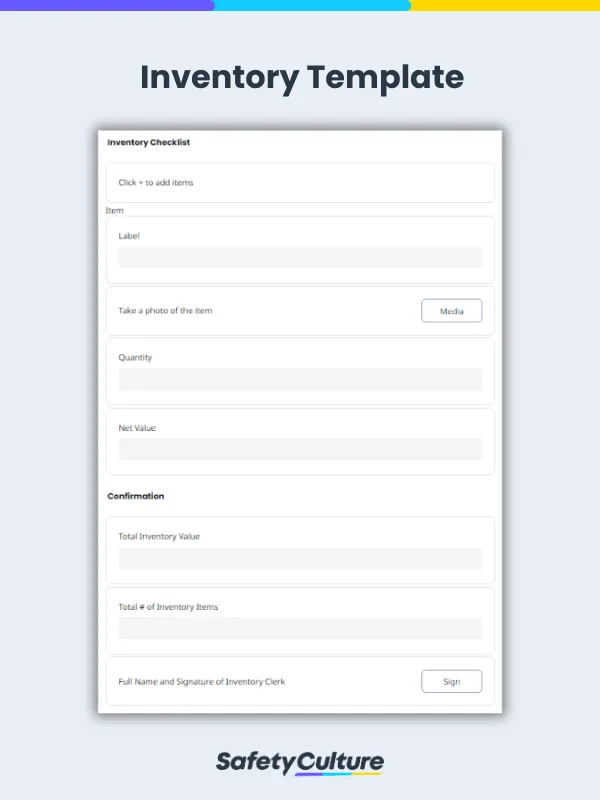
An inventory list template may differ per business or industry use such as retail, manufacturing, construction, and healthcare. However, an ideal inventory list template should outline these items :
Item ID – This should at least detail the item name and ID (or SKU)
Location – This specifies the location of the Item stated
Net Value – Net value of items are often required in every inventory management. This helps with forecasting finances and make better business decisions.
Quantity – The total amount of items available. The condition of the items should also be noted and specify the quantity of items that may be damaged.
Notes – Additional notes for the inventory manager/auditor to use. Oftentimes, this states when the item arrived in the inventory.
Here’s an example of a completed inventory list template, exported to a PDF file :
Inventory Template Sample PDF Report | Mitti (by SafetyCulture)