Mitti by SafetyCulture
Pricing
Log inSign up for free
  1. Home
  2. Checklist guides
  3. Operations
  1. Home
  2. Checklist guides
  3. Operations
Mitti by SafetyCulture

The way the world works

Follow us

App Store
Google Play

Product

  • Pricing
  • Book a demo
  • Product updates
  • Mitti (by SafetyCulture)

Support

  • Help center
  • Contact us
  • API developer documentation
  • Digitize your checklist

Resources

  • Content library
  • App & software guides
  • Checklist guides
  • Topic guides
  • eBooks
  • Blog

Company

  • About
  • Careers
  • News room
  • Meet the leadership team
  • Events & webinars
Copyright © 2026 Mitti
StatusLegalPrivacyTerms & ConditionsSecurity

SafetyCulture has a new name. Say hello to Mitti. Learn More.

Powered by

Job Sheet Template

Conveniently submit job sheet reports to clients while onsite using mobile-ready job cards.

Rated 4.6/5 stars on Capterra | 3k+ app store reviews
Use templatePreview template
Job Sheet Template
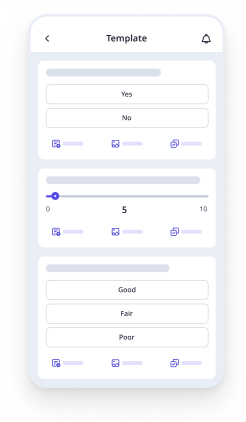
Mobile Preview
See the template in action (opens in new tab)

This job sheet template can be used by employees to record the description of work and have the option to capture photos for evidence of the job completed. Use this template to:

  • Record hours rendered and costing of materials used

  • Keep track of tasks that were performed

  • Identify issues and assign corrective actions

  • Affix the digital signatures to validate the work performed

Job Sheet Template
Mobile Preview
See the template in action (opens in new tab)

Why Mitti digital checklists?

  • Free to use for up to 10 users

  • Eliminate paperwork with digital checklists

  • Generate reports from completed checklists

Use template
  • What is a Job Sheet Template?
  • Purpose
  • Benefits
  • What is a Job Sheet Template?
  • Common Mistakes to Avoid
  • What to Include in a Job Sheet Template
  • Challenges of Using Paper-based Forms
  • FAQs About Job Sheets

In this article

  • What is a Job Sheet Template?
  • Purpose
  • Benefits
  • What is a Job Sheet Template?
  • Common Mistakes to Avoid
  • What to Include in a Job Sheet Template
  • Challenges of Using Paper-based Forms
  • FAQs About Job Sheets

Eliminate paperwork with digital checklists

Skip the setup and get to work in seconds.

Use template

Article by

Jona Tarlengco

|

5 min read

|

17 Sept 2025

What is a Job Sheet Template?

A job sheet is a tool used by workers to document key tasks performed onsite and obtain the required client sign-off upon completion. It acts as a standardized checklist and record-keeping tool for work that needs to be done, is in progress, or has been completed. Job sheets are commonly used across engineering, manufacturing, and trade service businesses.

Purpose

The primary purpose of a job sheet is to keep track of everything that needs to be done for a specific job and to ensure that all the necessary steps are completed. Job sheets can be used in various industries and can be adapted to meet the specific needs of a business. They can also be used as standalone documents or incorporated into a more extensive process of the project management system.

Benefits

Job sheets are an efficient way to track the progress of job tasks and ensure that all necessary tasks are completed according to their specifications. They can help prevent errors and avoid missed steps, leading to time, money, and effort savings for businesses. They can also be used to help plan and track the progress of a job, all while ensuring that critical tasks are completed promptly.

In addition, a job sheet improves workflow by providing a clear guide for employees to observe, ensuring that all necessary information is included on the sheet, and using a format that is easy to follow. It can be used to track the quantity and quality of work performed. By using job sheets, businesses can improve their operations and produce high-quality products and services.

With a templated checklist, in particular, a job sheet can provide many benefits to you and your organization. By using a straightforward checklist for your job sheet, you can better understand and perform your tasks with no issues, as everything will be laid out for you. Templating it will also save you time and help promote a more standardized documentation process, as your job sheets will now be the same across the board, ensuring everyone is on the same page.

What is a Job Sheet Template?

A job sheet template is a generally-formatted version of a job sheet that can be used every time there’s a new task requiring a documented view of its overall progress. It is an efficient tool that reduces repetitive tasks such as creating job sheets from scratch and filling them manually.

Most existing job sheet templates are ready-to-use and just modified to accommodate the specific needs of a job, task, endeavor, or organization itself.

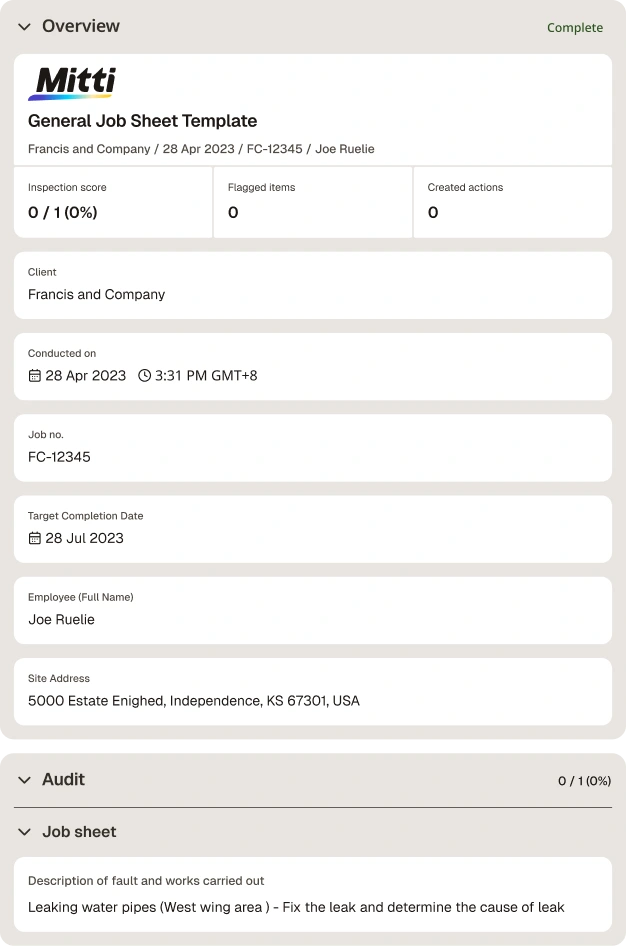
Here is a sample report using a job sheet template:

Job Sheet Template PDF Report

Preview Job Sheet Template PDF Report

Common Mistakes to Avoid

While job sheet templates can be a valuable tool for improving productivity and efficiency, there are several common mistakes you should avoid:

  • Not providing enough detail: It is important to provide clear and concise information and data on required materials and tools so as not to cause any misunderstandings between people and teams.

  • Neglecting to customize templates for specific jobs: While a general job sheet template can be useful, it’s best to customize it for specific jobs or tasks. This may involve adding or removing certain sections or providing additional information or instructions.

  • Overcomplicating the template: Job sheet templates should be designed to be user-friendly and easy to understand. Overcomplicating your sheet and its templated version with unnecessary information or formatting can make it difficult to use effectively, which can then cause misunderstandings and create an inefficient workflow.

What to Include in a Job Sheet Template

To avoid making the most common mistakes with your job sheet template, it is important to consider them all when creating your own.

When creating or filling out a job sheet, there are a few key components that should be included. Most importantly, job sheets should always outline specific job details, including the work to be done, the materials needed, and the time frame for the job. They should also list the crew or individual working on the job and the contact information for the customer or client. Finally, job sheets should include a map or directions to the job site.

Job sheet templates vary by industry but generally follow this job sheet format:

  • Customer information

  • Description of fault and works carried out

  • Additional works required

  • Costing and materials used

  • Worker and client sign-off

Make sure to update your job sheet template regularly with the necessary information and changes as time passes. As your organization will be experiencing different changes throughout its lifetime, your job sheet should also be kept up to date.

Challenges of Using Paper-based Forms

Given the nature of the information needed following the job sheet format, filling out job sheets present the following challenges:

  • Time-consuming to complete

  • Burdensome paperwork and difficult to recover

  • Difficult to analyze productivity and business KPI insights

For these reasons, it may be more helpful to explore more digital means of using and creating a job sheet. Digital solutions are now widely available for you to use, all of which aim to help improve your work systems and help you save time.

An example of one such solution is Mitti (by SafetyCulture). Some benefits Mitti (by SafetyCulture) can offer you include the following:

  • Ease of access: You can work anytime and anywhere because your job sheets will be easily accessible

  • Secure storage: Going digital ensures that your files will be safe in the cloud

  • Built-in reporting analytics: With Mitti (by SafetyCulture), you no longer have to struggle with reporting and insights, as the software will automatically do it for you, thus saving your time

Content library templates

Still looking for a checklist?

Search, filter, and customize 60,000+ templates across industries and use cases.

Browse Library

FAQs About Job Sheets

JT

Article by

Jona Tarlengco

Mitti (by SafetyCulture) Content Specialist

View author profile

Related resources you might like

Templates

Powered by

Engineering Job Sheet Template

Document key tasks performed on-site using this engineering job sheet template. Record description of fault and works carried out, provide other details such as completion of risk assessment, car park, expenses, etc., and capture photo evidence. Also, indicate if the job was completed and the number of hours rendered to perform the on-site task.

View template in library

Powered by

Job Card Template (Supplier)

This job card format of a ready-to-use template can be leveraged by suppliers to record items before delivery or transport. Detail the item description, quantity, cost, and any special instructions provided by customers. Affix the customer’s digital signature to confirm delivery of the items.

View template in library

Powered by

Automotive Services Job Sheet Template

This automotive services job sheet template is specifically intended for automotive businesses and companies. Capture vehicle details, customer instructions and mechanical parts needed for the repair. Validate the audit by providing a digital signature.

View template in library

Articles

Recreation Management Software

Explore top recreation management software to streamline operations, enhance user experience, and simplify managing recreational activities.

Learn more

Transportation and Logistics: What’s the Difference?

Learn about the importance of transport and logistics within the supply chain and how it is used in business operations.

Learn more

Restaurant Checklist

Download free restaurant checklists for opening, closing, cleaning, safety, and health inspections—with templates for every shift.

Learn more