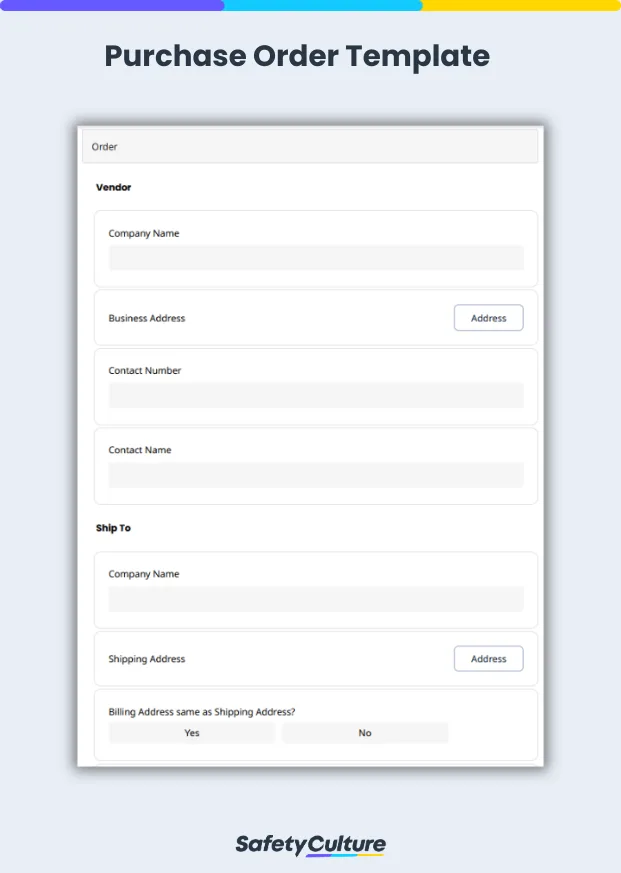
A purchase order template can be considered a type of order form. It is specifically created when a business is in the process of procuring a set of items, while an order form is very general and can be used in a variety of other ways such as construction material orders or repair/maintenance orders in facilities.
Another distinctive difference between the two is that purchase order templates are usually created by the buyer and sent to the seller for approval, while order forms are initially filled out by the seller and then by the buyer only according to the information already specified in the document.
Types of Purchase Orders
There are four main types of purchase orders: standard, planned, blanket, and contract. Each served a different purpose depending on the timing and quantity of the purchase. Here is a brief description of each.
Standard Purchase Order – Standard PO is a straightforward document, mostly used for one-time or irregular purchases. It contains all the important details of an order, such as the quantity, price, and specific delivery date.
Planned Purchase Orde r – A Planned PO is typically used for multiple transactions over a specified period. Instead of a fixed delivery date, it includes a tentative one for future transactions, even if they are not yet finalized. This enables businesses to plan for expected demand and respond accordingly when purchases are finalized.
Blanket Purchase Order – A Blanket PO is commonly used for recurring purchases of an item or set of items and services from the same supplier, over a set period. It doesn’t have to include a specific or tentative delivery date, since this can be decided based on the buyer’s needs over time. A maximum spending limit is often determined so that the organization can stay within its planned budget.
Contract Purchase Order – Contract PO is essentially a legally binding contract between the buyer and seller. This specifies the terms and conditions of future orders, but is more open-ended when it comes to quantities and delivery dates.
Why Use Templates for Purchase Orders
A purchase order template is a widely-used business document that eases the monitoring of transactions in various industries, especially when purchasing large numbers of items. It helps set the expectations between buyers and sellers, and assists in managing the whole procurement process. Although this can vary depending on the purpose of the project or the company, there are a few other reasons why it’s important to consistently integrate the use of a purchase order template into your business strategies:
Streamlines process – The use of purchase order template promotes efficiency in the procurement process. During this early stage of the process, buyers and sellers can already catch any mismatch or discrepancy, and address them before pushing through with the next part. It also helps prevent procurement delays and ensures that everything is going smoothly according to the plan.
Protects buyers and sellers – One of the main purposes of utilizing purchase order templates is that they protect both the buyer and seller from any misdeeds from the other party. Once the seller approves the purchase order, it becomes a legally binding document that covers both parties and helps ensure that they will adhere to the terms and conditions declared to fulfill the set agreement.
Allows for proper documentation – It is important to have a record of every transaction that a business has, especially if it’s with an external party. Purchase order templates can be used as accurate and detailed documentation of procurement transactions.
What to Include in a Purchase Order Template
The elements of a purchase order template can vary depending on the specifications of the business and can be modified according to the needs of the particular project. Below are items that are generally included in a basic purchase order:
Buyer – Name of the buyer (individual or company)
Company logo – This is optional, but can help with the branding
Seller – Name of the seller (vendor or supplier)
Point of contact – Buyer’s point of contact (name, email, phone)
Purchase order number – Unique identifier for the order
Order information/item description – Detailed description of the products or services required
Quantity – Number of items or amount of order
Shipping address – Address where the goods should be delivered
Shipping method and terms – If any specific terms or conditions should be recognized
Shipping date – Expected shipping/delivery date
Billing address – This is for invoice or billing processes
Signature – Add signature as necessary
Order date – Indicate when the PO was created
Total – Calculated sum of the order amount
How to Use and Fill Out the Purchase Order Template
Make a purchase order by using one of our existing purchase order templates, or create and customize your own, and then follow the steps below:
Header – Specify your company’s information such as company name, logo, address, and other key details.
Seller information – Include the vendor’s information in this part and indicate the seller’s company name, contact information, and other important details.
Shipping details – Provide the shipping specifications of the recipient such as address, shipping method, and other additional information.
Order details – Indicate a detailed description of the purchase order. Buyers should specify the expected quality of the item, the quantity, and even the unit price so that sellers would be able to confirm if they can fulfill the request.
Summary – State the accounting details such as subtotal, applicable discounts, tax rates, and expected total cost of the purchase order. This is also the part where you can include any extra information that you want to note.
Once done with the steps above, you can now send the purchase order to the intended recipient. With Mitti (by SafetyCulture)’s free plan, you can export the form to Word, Excel, or PDF, and send the document to the seller via email.
Purchase Order Sample PDF Report
Here’s a sample of a completed purchase order filled out using a pre-designed template.
Purchase Order Sample PDF Report