What is a Construction Risk Register Template?
A construction risk register template is a structured document used to identify, score and track risks across a construction project. It captures each risk in a standardized format so project managers, safety leads and site supervisors all work from the same log. This document also ensures all stakeholders are updated as conditions change and that identified risks are not abandoned after the planning phase.
What to Include in a Construction Risk Register Template
A construction risk register can be customized to accommodate for specific business needs, but generally includes these fields for effective documentation:
Risk ID — A unique reference number for tracking and cross-referencing each entry
Risk category — The type of risk: site, safety, schedule, cost, or environmental
Risk description — A straightforward statement of what could go wrong and why
Likelihood score — How probable the risk is, rated 1–5 (rare to almost certain)
Impact score — How severe the consequence would be, rated 1–5 (insignificant to critical)
Risk rating — Formulated by multiplying the likelihood and impact score, calculated automatically in a digital register
Risk owner — The named person accountable for monitoring and actioning this risk
Response type — Determines where the risk is to be avoided, reduced/controlled, transferred, or accepted
Mitigation actions — The specific steps in place to reduce likelihood or impact
Review date — When the checklist will next be assessed
Risk Response and Mitigation Strategies
Every risk in the register needs a response type assigned — not just a description of what might happen. These four standard responses are often used for construction risks:
Avoid — Eliminate the risk entirely. An example is redesigning an excavation sequence to remove the need to work near an unstable wall.
Reduce/Control — Lower the likelihood or impact. For example, mandatory silica dust controls and respiratory PPE for all concrete cutting activities.
Transfer — Shift the financial or legal risk to another party. This can involve contractual clauses that pass design risk to the structural engineer, or insurance cover for extreme weather delays.
Accept — Acknowledge the risk and monitor it without active mitigation. Reserved for low-rated risks where the cost of mitigation outweighs the potential impact.
When using the construction risk register template, log the chosen response type in the register alongside the mitigation actions already in place. Byblos Construction found that digitizing their risk assessments and compliance checks with Mitti (by SafetyCulture) allowed field teams to notify site leaders of emerging risks faster to reduce blind spots between the register and what was actually happening on site.
Most Common Construction Risks to Pre-Populate in Your Register
Starting a risk register from scratch on every project wastes time and increases the chance of missing something significant. Experienced construction teams pre-populate their register with a core set of known risks at project kickoff, then add site-specific entries as conditions are confirmed.
Here are the risk categories worth loading into your template before the first site visit.
Site, environmental and weather risks
Unstable ground conditions and excavation hazards
Flooding, extreme heat or cold, and high winds affecting working conditions
Contaminated land including asbestos in soil, buried tanks, legacy chemical use
Proximity risks such as damage to or from adjacent structures, live roads, and overhead lines
Environmental risks often connect to local regulatory obligations, so flag these early. They're the risks most likely to cause project delays if they surface late.
Health, safety and regulatory risks
Falls from height
Working with plant, cranes, and heavy machinery on congested sites
Electrical hazards, especially from overhead and buried services, temporary power installations
Hazardous materials such as silica dust from concrete cutting, asbestos in existing structures, lead paint
These risks directly correspond to requirements under OSHA 29 CFR 1926, the primary US federal standard for construction safety. Failing to document and mitigate these risks isn't just a safety failure — it's a regulatory one. OSHA enforcement action, fines, and stop-work notices are all live consequences for construction businesses without documented risk controls.
Schedule, cost and resource risks
Supply chain delays for critical materials such as structural steel, concrete, specialist equipment
Subcontractor performance and scope disputes
Labor shortages affecting key trades including electricians, concreters, scaffolders
Design changes late in the program that require rework
Budget overruns driven by cost escalation or unforeseen ground conditions
A construction risk register that only covers safety misses half the project. Schedule and cost risks belong in the same log — reviewed by the same people, at the same cadence.
How to Fill Out a Construction Risk Register Step by Step
Filling out a construction risk register isn't a one-time task. Done well, it's a project habit — updated at key milestones, reviewed by the project team, and used to drive actual decisions. The risk assessment process provides the theoretical backbone; this section is the practical field version.
Step 1: Identify and categorize risks
Start with a team brainstorm: project manager, site supervisor, safety lead, and key subcontractors in the same room (or call). The goal isn't to be exhaustive from the start; it's to surface the most significant risks before work begins.
For each risk identified, assign it a category: site, safety, schedule, cost, or environmental. Pre-populating from a standard risk list cuts this step from hours to minutes. Teams can review the pre-loaded entries, delete what doesn't apply, and add anything site-specific.
Step 2: Assess and score each risk
Work through the register row by row. For each risk, rate likelihood and impact on the 1–5 scale, then calculate the risk rating. Flag anything scoring 12 or above for immediate attention before work begins in that area.
Don't over-engineer this step. A competent site manager can rate most risks in under a minute. The purpose is to surface the high-rated items quickly — not to produce a mathematically precise risk model.
Step 3: Assign owners and review regularly
Every risk without an owner is a risk that nobody will act on. Assign a named person — not a role — to each entry. They're accountable for monitoring the risk, confirming mitigations are in place, and updating the register when conditions change.
Set a review cadence at the start: weekly for high-rated risks, monthly for medium, at key project milestones for everything. With a digital tool like Mitti (by SafetyCulture), risk owners receive automated reminders and can update their entries directly from a digital device.
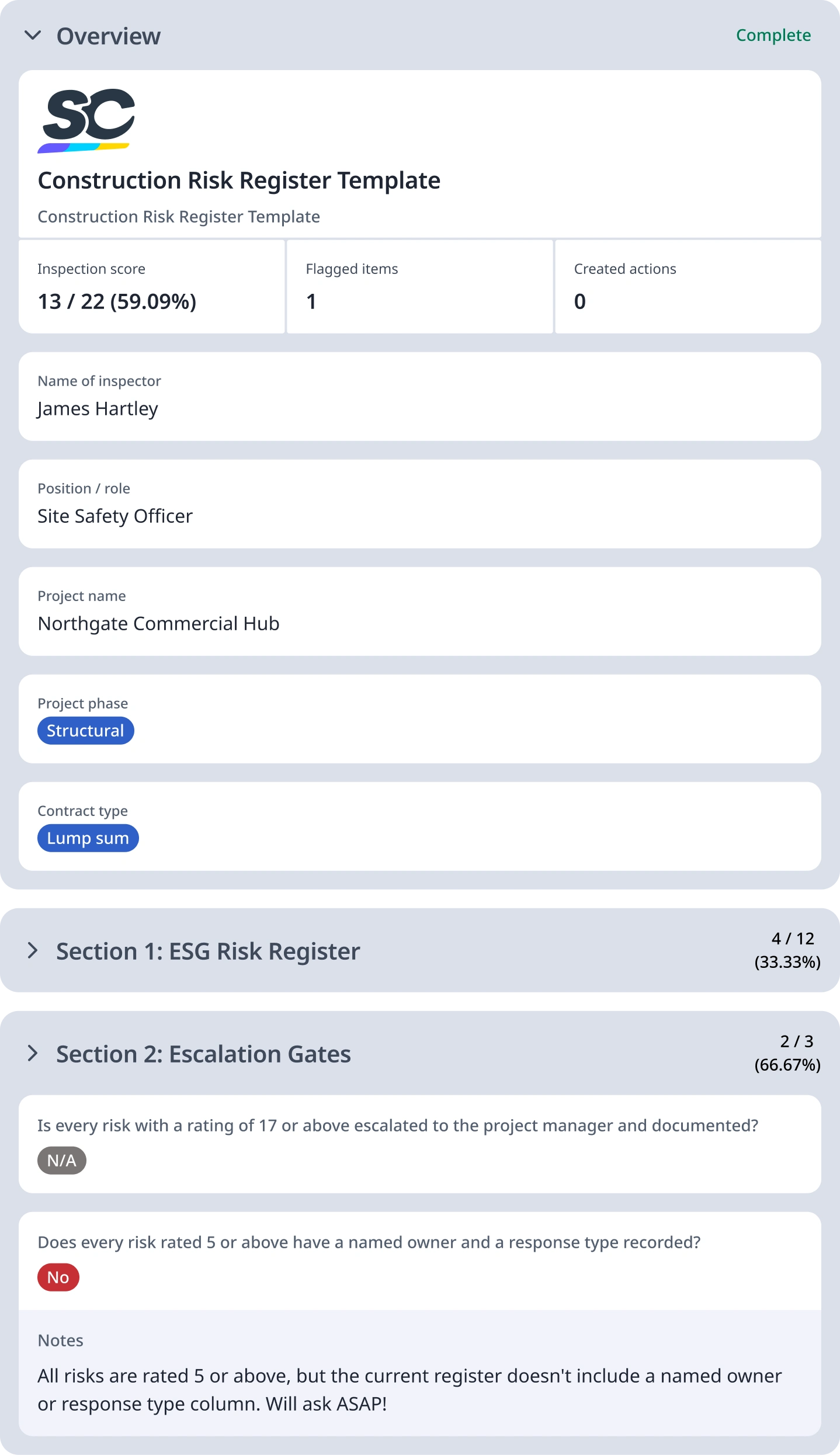
For reference, this is an example of a filled out construction risk register template:


Still looking for a checklist?
Search, filter, and customize 60,000+ templates across industries and use cases.