This ready-to-use daily temperature log helps you track food and equipment temperatures across your operation. Use it to stay compliant, act fast when readings go out of range, and keep a clear record for health inspections.
Use this free visitor log template to record and manage all site visitors in one place. It's ready to use out of the box and easy to customise for your facility.
Capture visitor details instantly — record full name, contact information, host, and purpose of visit at the point of entry
Log arrival and departure times — track exactly when visitors sign in and out to maintain an accurate on-site record at all times
Verify identification — include an ID check field to meet security and compliance requirements without slowing down the sign-in process
Assign visitor badges and access levels — note which areas a visitor is permitted to access, so your team can escort and manage them appropriately
Store records digitally — completed logs are saved automatically to Mitti (by SafetyCulture), making them easy to retrieve during audits or incidents
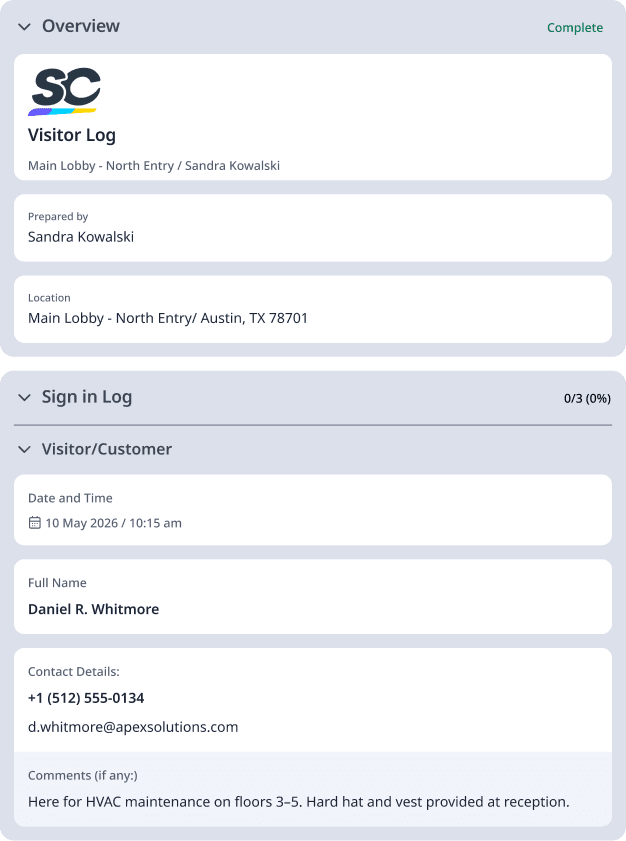
Keep track of everyone who enters your workplace—without the paperwork headache with the help of visitor log templates.
Use this Visitor Safety Induction Template to brief visitors on your site's safety procedures, emergency protocols, and specific hazards before they enter. Customize it to match your organization's safety requirements and the type of visitors you receive.
This Visitor Sign-in Sheet Template makes it easy to record visitor details — including their reason for visiting, contact person, and signature- in one place. Generate offline reports and keep an accurate attendance record using Mitti (by SafetyCulture).
This Visitor Register is designed for crew leaders to manage and record visitor entry to a worksite. Use it to maintain a clear log of who's on-site and ensure every visit is properly authorised before access is granted.
A visitor log is a record of every person who enters a facility or worksite. It typically captures the visitor's name, contact details, the date and time of their visit, who they're meeting with, and the reason for their visit.
Visitor logs are used across industries—from construction sites and manufacturing plants to hospitals, schools, and corporate offices. Whether it's a contractor checking in on-site or a client visiting your head office, the log creates a clear, time-stamped record of who was where and when.
Traditionally kept as a paper sign-in book at reception, most organizations are now moving to digital visitor logs that can be completed on a tablet or phone — making the process faster, more accurate, and easier to manage.
Knowing who's in your building at any given time isn't just good practice — in many workplaces, it's a legal requirement. Here's why a visitor log matters:
Security and access control - A visitor log helps you monitor who enters and exits your facility. If something goes missing, an incident occurs, or an unauthorized person is spotted, you have a clear record to refer back to. It also deters opportunistic access — people are less likely to wander into restricted areas when they know they've been logged.
Emergency preparedness - In the event of a fire, evacuation, or other emergency, you need to know exactly who is on-site. A current visitor log means your emergency warden can account for everyone — including contractors and guests — quickly and accurately.
Compliance and legal protection - Many industries have specific requirements around visitor management. Healthcare facilities must meet HIPAA standards for visitor data. Construction sites are required under WHS/OHS legislation to maintain records of everyone on-site. Schools have duty-of-care obligations that require knowing who enters their premises. A well-maintained visitor log helps you meet these obligations and provides a paper trail if questions are ever raised.
Professionalism and trust - A structured sign-in process signals to visitors that your workplace takes safety and security seriously. It sets the right tone from the moment someone walks through the door.
A good visitor log template captures enough information to be useful without slowing or intruding on the sign-in process. Here's what to include:
Full name
Organization or company (if applicable)
Contact number or email address
Government-issued ID type and number (for high-security or regulated environments)
Date of visit
Time of arrival
Time of departure
Purpose of visit (meeting, delivery, maintenance, etc.)
Host name — the employee the visitor is there to see
Areas the visitor is permitted to access
Badge or pass number issued
NDA or site induction acknowledgement (where required)
Emergency contact details (for longer visits or contractors)
Signature or digital acknowledgement from the visitor
Vehicle registration (construction sites and warehouses)
Temperature check or health declaration (healthcare and food production)
SWMS (Safe Work Method Statement) confirmation for contractors
Getting started with a visitor log template in Mitti (by SafetyCulture) takes just a few minutes.
Open the visitor log template from the Mitti (by SafetyCulture) template library. You can use it as-is or copy it to your account to start editing.
Add or remove fields based on your industry and compliance requirements. A healthcare facility might add a HIPAA acknowledgement field. A construction site might include a vehicle registration and induction confirmation.
Assign the template to a tablet or device at your reception desk or site entry point. Visitors can complete the log themselves on arrival, or your front desk team can fill it in on their behalf.
All completed visitor logs are stored in Mitti (by SafetyCulture). You can filter by date, site or visitor name, export records for compliance reporting, and set up automated notifications for your security or facilities team.
Review your template every six to 12 months to make sure it still reflects your current security requirements, access zones, and compliance obligations.
Most organizations still start with a paper sign-in book — it's simple and costs nothing. But paper logs come with real limitations once your visitor volume grows or your compliance requirements tighten.
Paper log | Digital log | |
Setup cost | None | Low (app or software) |
Data accuracy | Risk of illegible entries | Enforces required fields |
Storage and retrieval | Manual filing, easy to lose | Searchable, cloud-stored |
Emergency use | Physical copy only | Accessible from any device |
Compliance reporting | Manual collation | Exportable reports |
Visitor experience | Slow if the queue builds up | Fast, can pre-register |
For small, low-traffic sites, a paper log may still be sufficient. For any organization with regular visitors, contractors on-site, or regulatory obligations, a digital visitor log is a straightforward improvement.