Mitti by SafetyCulture
Pricing
Log inSign up for free
  1. Home
  2. Checklist guides
  3. Compliance
  1. Home
  2. Checklist guides
  3. Compliance
Mitti by SafetyCulture

The way the world works

Follow us

App Store
Google Play

Product

  • Pricing
  • Book a demo
  • Product updates
  • Mitti (by SafetyCulture)

Support

  • Help center
  • Contact us
  • API developer documentation
  • Digitize your checklist

Resources

  • Content library
  • App & software guides
  • Checklist guides
  • Topic guides
  • eBooks
  • Blog

Company

  • About
  • Careers
  • News room
  • Meet the leadership team
  • Events & webinars
Copyright © 2026 Mitti
StatusLegalPrivacyTerms & ConditionsSecurity

SafetyCulture has a new name. Say hello to Mitti. Learn More.

Use template
  • What is a DVIR Form?
  • What is the purpose of a DVIR form?
  • What to include in one
  • How to use a form for creating DVIRs
  • DVIR form example
  • FAQs About DVIR Forms

In this article

  • What is a DVIR Form?
  • What is the purpose of a DVIR form?
  • What to include in one
  • How to use a form for creating DVIRs
  • DVIR form example
  • FAQs About DVIR Forms

Eliminate paperwork with digital checklists

Skip the setup and get to work in seconds.

Use template

Article by

Patricia Guevara

|

4 min read

|

30 Jan 2025

What is a DVIR Form?

A Driver Vehicle Inspection Report (DVIR) is a document designed for bus and truck drivers to assess the condition of their vehicles before and after each trip. This form serves as a critical tool for fleet management and regulatory agencies to monitor the condition of commercial vehicles, contributing to overall road safety. Drivers often use the DVIR form to document any defects or issues they observe, providing an efficient way to report and address maintenance needs promptly.

What is the purpose of a DVIR form?

The primary purpose of a DVIR form is to ensure the safety and roadworthiness of commercial vehicles. Commercial drivers must conduct pre-trip and post-trip inspections using the form to assess various vehicle components systematically. By documenting the condition of the vehicle, the DVIR form serves as a proactive tool to identify and address any defects or issues promptly before they escalate.

The use of DVIR forms also facilitates compliance with regulatory standards. Many transportation authorities and regulatory bodies, including the US Federal Motor Carrier Safety Administration (FMCSA), mandate the use of these forms to ensure that commercial vehicles meet safety requirements. Regular and thorough DVIR processes also help prevent accidents and breakdowns on the road, thereby promoting overall public safety.

DVIR forms also ensure that sensors and other Internet of Things (IoT) devices are working as intended. This ensures sensors are checked regularly for proper functioning as part of the pre-trip and post-trip inspections. If a sensor is found to be malfunctioning or damaged during the DVIR inspection, the driver can document it on the form, creating a record of the issue that needs to be addressed.

In addition to safety and compliance, the DVIR form creates a documented history of the vehicle’s condition over time. This historical data becomes crucial during audits, inspections, or investigations, allowing fleet managers and regulatory authorities to assess the maintenance history of a vehicle and ensure that it has been consistently in compliance with safety standards.

What to include in one

To ensure the effectiveness of the DVIR process, it’s essential to include specific key components in the form to be used for it. Doing this will help you create a systematic checklist for drivers to inspect various critical systems and components, promoting both safety and regulatory compliance.

Generally, the following pages and sections must be available and easy to fill out in your DVIR form:

  • Title Page

    • Driver Information

    • Vehicle Identification

    • Date and Time

  • Pre-Trip and Post-Trip Inspection

    • Essential vehicle components such as brakes, lights, tires, steering, suspension, and other safety-related features

  • Defect Reporting

  • Repair Action (if applicable)

  • Completion Page

    • Driver’s Signature

    • Mechanic’s Signature (if applicable)

    • Comments or Additional Notes

How to use a form for creating DVIRs

Utilizing a form for completing DVIRs ensures that safety checks are consistently conducted and any defects or issues are promptly documented for necessary action. To guide you better, here’s a quick step-by-step process for using a DVIR form:

  1. Start by filling in the driver’s information on the form, including their name, date, and any relevant identification details to establish a clear record of who performed the inspection.

  2. Specify the make, model, year, and license plate number of the vehicle being inspected.

  3. Record the date and time of both the pre-trip and post-trip inspections accurately, ensuring they’re conducted at the required intervals.

  4. Go through the checklist and mark off each safety-related component for a thorough examination.

  5. After completing the trip, repeat the inspection process using a similar checklist for post-trip to identify any new issues that may have arisen during the journey.

  6. Document any defects, issues, or abnormalities discovered during both inspections.

  7. Document immediate actions taken to address identified defects, if any. Mark items for repair, maintenance, or further inspection.

  8. Sign the DVIR form to confirm that the inspection has been completed and the reported information is accurate.

  9. If repairs or maintenance need to be conducted, leave a space for the mechanic or authorized personnel to sign, confirming the completion of the necessary actions.

  10. Use any additional space on the form for comments or notes that may provide context or additional information about the inspection or repairs.

DVIR form example

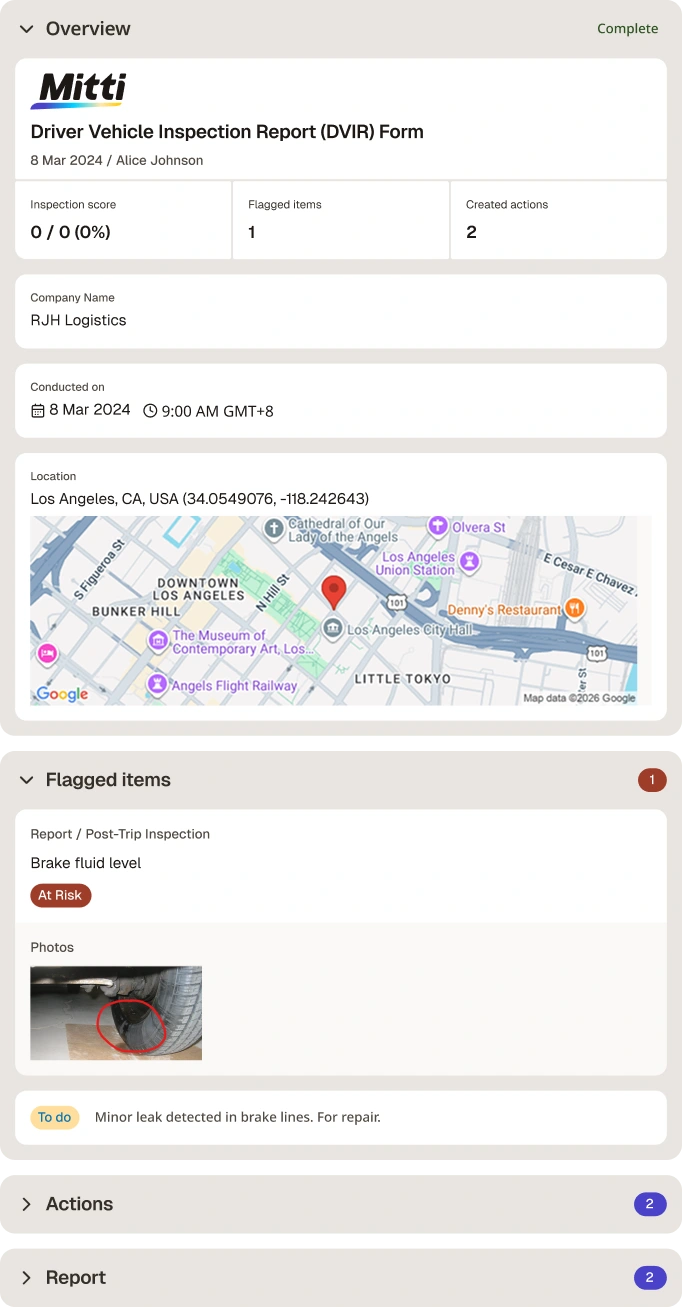
Here’s a sample DVIR form when filled out and exported as a PDF report:

Sample DVIR

Sample DVIR form | Mitti (by SafetyCulture)

Content library templates

Still looking for a checklist?

Search, filter, and customize 60,000+ templates across industries and use cases.

Browse Library

FAQs About DVIR Forms

PG

Article by

Patricia Guevara

Mitti (by SafetyCulture) Content Specialist

View author profile

Powered by

DVIR Form

Efficiently document vehicle conditions before and after each trip using a Driver Vehicle Inspection Report (DVIR) form.

Rated 4.6/5 stars on Capterra | 3k+ app store reviews
Use templatePreview template
DVIR Form
Mobile Preview
See the template in action (opens in new tab)

Download this free DVIR form to streamline and document your pre-trip and post-trip vehicle inspections. Simplify your inspection process by covering essential information on safety checks and proactive assessments by doing the following using this template:

  1. As the driver, fill in details about your company, the vehicle being inspected, and your driver credentials.

  2. Inspect each component and aspect, especially safety-related ones, of your vehicle and mark whether it’s Safe, At Risk, or Not Applicable. Make sure to do this twice, one for pre-trip and another for post-trip.

  3. Record any defects or issues found during both pre- and post-inspections. As needed, endorse any corrective actions to relevant personnel.

  4. Add contextual notes and attach media (e.g., annotated photos, videos, and other files) to provide evidence of the issues.

  5. Before completing the report form, include digital signatures.

  6. Export it into a digital DVIR file (PDF, Excel, or Word) for recordkeeping and store it securely on the cloud.

DVIR Form
Mobile Preview
See the template in action (opens in new tab)

Why Mitti digital checklists?

  • Free to use for up to 10 users

  • Eliminate paperwork with digital checklists

  • Generate reports from completed checklists

Related resources you might like

Templates

Powered by

Daily Construction Vehicle Inspection Report - Industry Vetted

Developed by Mitti (by SafetyCulture)’s Industry Expert Partners, construction companies can use this to guide drivers through critical daily inspections before operating any motor vehicle. Verify general condition, tires, lights, signals, horn, fluids, engine compartment, brakes, steering, trailer condition (if applicable), safety equipment, and required documentation to mitigate risks and ensure a safe workday.

View template in library

Powered by

Vehicle Inspection Report

Use this vehicle inspection report during maintenance checks to effortlessly generate detailed reports on the condition of a vehicle. Use this report to raise issues and resolve them accordingly.

View template in library

Powered by

Heavy Vehicle Inspection Checklist

Use this template to assess heavy vehicles in your organization’s fleet and prepare for annual vehicle inspections. Identify potential problems and other mechanical issues before they escalate and ensure compliance with vehicle regulations.

View template in library

Articles

REACH Compliance Software

Explore 7 of the best REACH compliance software to enhance regulatory adherence and chemical management for businesses.

Learn more

A Comprehensive Guide to Creating a Risk Treatment Plan

Learn how to write a risk treatment plan, align it with ISO 27001 and 31000, and monitor it over time with practical steps and examples.

Learn more

ISO 17025 Checklist

Use this free ISO 17025 checklist template to help your lab meet accreditation requirements and digitize preparations for certification.

Learn more