Biggest Causes of HIPAA Breach
HIPAA breaches can happen due to several reasons, including the following:
Unintentional error – This refers to instances wherein medical practitioners disclose medical conditions and sensitive patient information to the wrong person. It also covers situations where unsecured medical documents can be easily accessed by unauthorized people.
Cyberattacks – Cases of hacking, ransomware, or malware can compromise information security and expose massive sensitive data containing individually identifiable health information leading to millions of dollars in settlement.
Lost/stolen device – Lost or stolen laptops, USBs, or handheld devices can lead to unauthorized access to electronic PHI (ePHI). Devices with proper encryption of PHI can help avoid HIPAA breaches.
Unauthorized disclosure/access – exposing PHI to inappropriate avenues or not correcting unauthorized access can be costly if not addressed appropriately.
Why Use a Checklist For HIPAA Compliance
It’s important to note that vulnerabilities and new threats to the security of PHI need to be addressed to stay HIPAA compliant. This is why using a HIPAA compliance checklist is highly recommended.
Apart from that, the following are some of the benefits organizations can achieve from using one:
Ensuring in-depth and streamlined coverage – Since HIPAA regulations are complex, a checklist can help provide a structured approach to ensure comprehensive coverage of all relevant requirements.
Identifying potential gaps – A checklist helps identify any gaps in compliance that may exist in an organization’s policies, procedures, and practices to address them toward full compliance.
Providing a standardized approach – It provides a standardized format for HIPAA compliance that can be used consistently across an organization.
Facilitating audits and assessments – Also, HIPAA compliance checklists can help provide a clear record of an organization’s compliance activities to demonstrate to auditors that the necessary PHI protection safeguards are in place.
What to Include in a HIPAA Compliance Checklist
To help make your HIPAA compliance template comprehensive, ensure that it includes elements such as a title page and sections for administrative, physical, and technical safeguards. Here are example questions to ask using the checklist:
Questions | Compliant | Non-Compliant | Not Applicable |
Administrative | | | |
Has a Risk Analysis been completed IAW NIST Guidelines? | | | |
Has the Risk Management process been completed IAW NIST Guidelines? | | | |
Do you have formal sanctions against employees who fail to comply with security policies and procedures? | | | |
Have you implemented procedures to regularly review records of IS activity such as audit logs, access reports, and security incident tracking? | | | |
Identify the security official who is responsible for the development and implementation of the policies and procedures required by this subpart for the entity. | | | |
Physical | | | |
Have you established (and implemented as needed) procedures that allow facility access in support of restoration of lost data under the disaster recovery plan and emergency mode operations plan in the event of an emergency? | | | |
Have you implemented policies and procedures to safeguard the facility and the equipment therein from unauthorized physical access, tampering, and theft? | | | |
Have you implemented procedures to control and validate a person’s access to facilities based on their role or function? | | | |
Including visitor control, and control of access to software programs for testing and revision? | | | |
Have you implemented physical safeguards for all workstations that access EPHI to restrict access to authorized users? | | | |
Technical | | | |
Have you assigned a unique name and/or number for identifying and tracking user identity? | | | |
Have you established (and implemented as needed) procedures for obtaining necessary EPHI during an emergency? | | | |
Have you implemented procedures that terminate an electronic session after a predetermined time of inactivity? | | | |
Have you implemented a mechanism to encrypt and decrypt EPHI? | | | |
Have you implemented Audit Controls, hardware, software, and/or procedural mechanisms that record and examine activity in information systems that contain or use EPHI? | | | |
5 Steps to be HIPAA Compliant
Follow these simple steps below to ensure HIPAA compliance:
Identify and assess potential risks and vulnerabilities to PHI and evaluate the likelihood and impact of a breach.
Develop and implement policies and procedures that address the identified risks and vulnerabilities.
Train all employees who have access to PHI on HIPAA regulations, the organization’s policies and procedures, and the importance of protecting PHI.
Implement technical safeguards to secure PHI, such as encryption, access controls, and backups, and physical safeguards such as secure storage and disposal of records.
Regularly review and update policies, procedures, and security measures to ensure they remain effective and compliant with HIPAA regulations.
How to Stay HIPAA-Compliant with the Help of Checklists
Avoid HIPAA violations with these straightforward tips:
Start with Human Resources (HR).
Recruit the right staff, conduct background checks, and provide the proper training on handling patient information. Keep your staff updated about new risks to information security.
Evaluate the compliance of staff and partners.
Check the practices of staff and vendors handling PHI. Reinforce HIPAA-compliant practices by conducting audits (per HIPAA) and observing staff while on the job. Ask vendors for evidence of HIPAA compliance.
Set up access controls.
Establish physical safeguards for access to information and implement encryption of PHI to mitigate the risk of an information breach. Also, make sure that your IT team is always updated about threats and that the systems in place are prepared for cyberattacks.
Conduct security risk assessments.
Institutions and their staff are constantly exposed to new threats to information security. Hence, conducting regular security risk assessments can help identify and immediately mitigate new and evolving risks to prevent costly HIPAA breaches from taking place.
HIPAA Compliance Checklist PDF
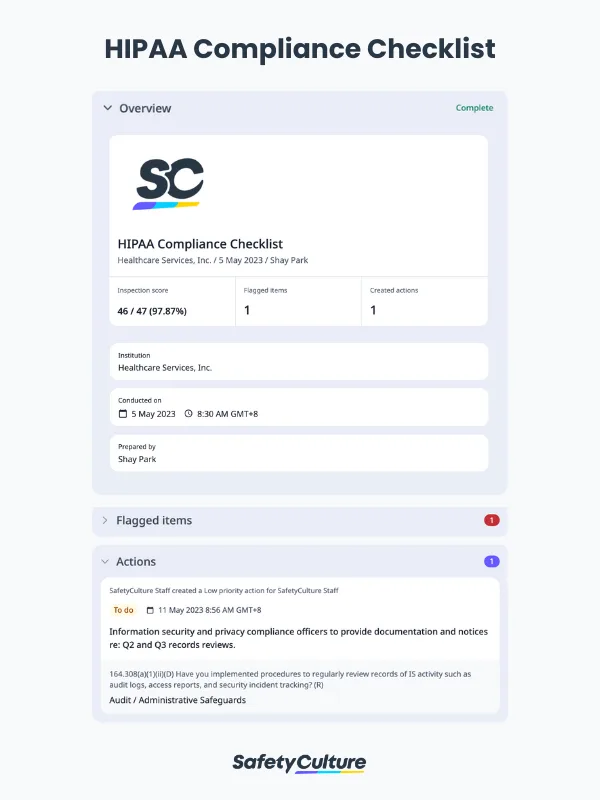
Here’s a look of a completed HIPAA compliance report in the format of a PDF:
HIPAA Compliance Checklist Sample PDF Report | Mitti (by SafetyCulture)