Mitti by SafetyCulture
Pricing
Log inSign up for free
  1. Home
  2. Checklist guides
  3. Compliance
  1. Home
  2. Checklist guides
  3. Compliance
Mitti by SafetyCulture

The way the world works

Follow us

App Store
Google Play

Product

  • Pricing
  • Book a demo
  • Product updates
  • Mitti (by SafetyCulture)

Support

  • Help center
  • Contact us
  • API developer documentation
  • Digitize your checklist

Resources

  • Content library
  • App & software guides
  • Checklist guides
  • Topic guides
  • eBooks
  • Blog

Company

  • About
  • Careers
  • News room
  • Meet the leadership team
  • Events & webinars
Copyright © 2026 Mitti
StatusLegalPrivacyTerms & ConditionsSecurity

SafetyCulture has a new name. Say hello to Mitti. Learn More.

Powered by

IT Risk Assessment Template

Proactively address information technology risks and make the most out of your business operations.

Rated 4.6/5 stars on Capterra | 3k+ app store reviews
Use templatePreview template
IT Risk Assessment Template
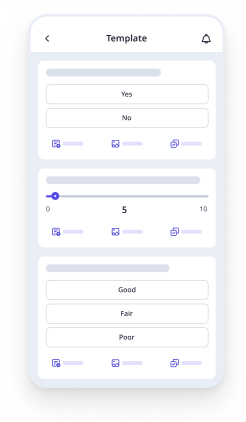
Mobile Preview
See the template in action (opens in new tab)

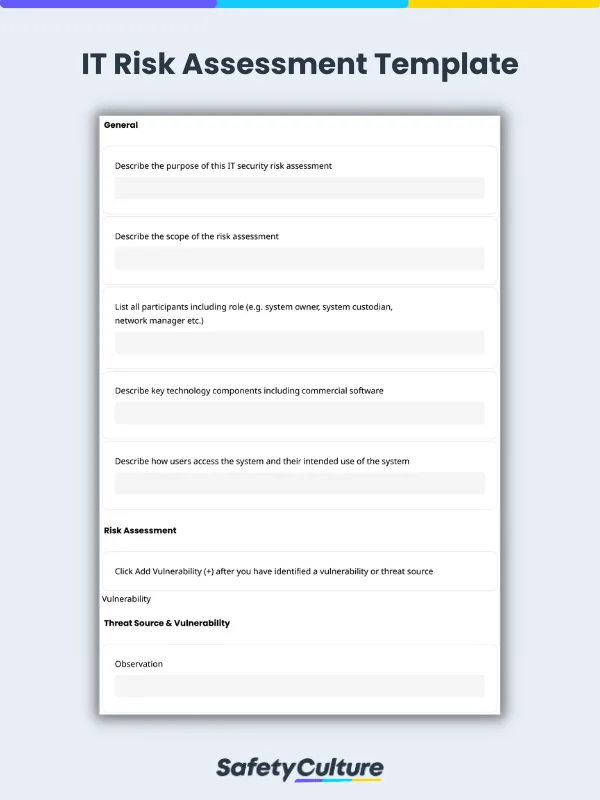
An IT risk assessment template is used to perform security risk and vulnerability assessments in your business. IT Professionals can use this as a guide for the following:

  1. Identify the source of threat and describe existing controls

  2. Assess the possible consequence, likelihood, and select the risk rating

  3. Provide recommendations

  4. Enter as many risk items as possible

IT Risk Assessment Template
Mobile Preview
See the template in action (opens in new tab)

Why Mitti digital checklists?

  • Free to use for up to 10 users

  • Eliminate paperwork with digital checklists

  • Generate reports from completed checklists

Use template
  • What is IT Risk Assessment?
  • What is an IT Risk Assessment Template?
  • IT Risk Assessment Checklist Steps
  • Vulnerabilities and Threats to Information Security
  • 7 Key Items for Information Technology Risk Assessments
  • IT Risk Assessment Example

In this article

  • What is IT Risk Assessment?
  • What is an IT Risk Assessment Template?
  • IT Risk Assessment Checklist Steps
  • Vulnerabilities and Threats to Information Security
  • 7 Key Items for Information Technology Risk Assessments
  • IT Risk Assessment Example

Eliminate paperwork with digital checklists

Skip the setup and get to work in seconds.

Use template

Article by

Mitti (by SafetyCulture) Content Team

|

5 min read

|

29 Jul 2024

What is IT Risk Assessment?

IT Risk Assessment identifies, assesses, analyzes, and mitigates risks associated with an organization’s IT systems, data, and infrastructure. It proactively manages potential threats and vulnerabilities to prevent security incidents that may negatively impact business operations and assets.

What is an IT Risk Assessment Template?

An IT risk assessment template is a tool used by information technology personnel to anticipate potential cybersecurity issues and mitigate risks to organizational operations.

IT Risk Assessment Checklist Steps

Steps to consider when conducting an information security risk assessment:

  • Identify the purpose of the risk assessment

  • Consider key technology components

  • Identify and observe the vulnerability or threat source

  • Evaluate the risks

  • Recommend controls or alternative options for reducing risk

Vulnerabilities and Threats to Information Security

Be mindful of these latest threats and vulnerabilities that your company may need to proactively deal with:

Ransomware

This is a malware designed to illegally access personal data and restrict victims’ access to their proprietary information while forcing them to pay a ransom. Large companies have fallen victim to ransomware attacks costing hundreds of millions of dollars.

Major data breaches

Data breaches happen because of various reasons such as weak or stolen credentials, compromised assets, or card frauds, among others. Cyber attacks such as this threaten to expose massive data on customer and company information.

Malware and malicious mobile apps

This type of vulnerability is normally caused by applications gotten from untrustworthy or malicious sources. The tactic is to gather personal information and other data without the user’s permission and knowledge—which can then be used in various negative ways.

Computer hijacking

Also called cyber hijacking, computer hijacking is the processing power of company computers hijacked for cryptocurrency mining. It is a type of information threat where an attacker can take control of the network of computers and software programs used by an organization.

Artificial intelligence

Attackers also administer the use of machine learning to build better hacking programs and implement more targeted phishing techniques. With the use of artificial intelligence, they keep track of potential victims’ online patterns, defenses, and vulnerabilities.

Internet of Things (IoT)

Along with the progress of technology comes a considerable increase in threats to information and an even more threat to private data. More connected devices mean greater risk, making IoT networks more vulnerable to overload, lockdown, or getting compromised.

Vulnerabilities and threats to information security can be found and addressed by conducting IT risk assessments.

7 Key Items for Information Technology Risk Assessments

Consider these key points when conducting IT risk assessments:

1. Identify company assets

These could be proprietary information, hardware, software, client information, network topology, etc. It’s best to collaborate with other departments to determine other valuable company assets and which ones to prioritize.

2. Recognize the threats

Be aware of these main sources of threats that an organization usually encounters:

  • Natural disasters

  • Human error/malicious intent

  • System failure

3. Spot the vulnerabilities

Vulnerabilities are security weaknesses that can expose information, data, and assets to various threats. Conduct internal audits, penetration testing, continuous employee training, and raise awareness to find IT vulnerabilities in your organization.

4. Assess the likelihood of incidents

Evaluate the assets’ vulnerability to threats, from there, assess the likelihood of an incident happening. This can be done while considering various factors that affect an organization’s security such as risks, compliance and policy, and continuity plans, among others.

5. Specify possible repercussions

One or a combination of the following can happen if company assets get impacted by threats and other forms of vulnerabilities: legal action, data loss, production downtime, fines and penalties, negative impact on company reputation, etc.

6. Determine controls

Determine what controls are already existing to mitigate threats. From there, work on identifying how to improve governance and protection against potential vulnerabilities. New controls may need to be implemented or old ones updated to adapt to new and changing threats.

7. Improve continuously

Conduct risk assessment regularly or as frequently ideal as possible. This helps proactively identify inconsistencies in security, thus, addressing them even before they cause actual threats. Document and review the results of IT risk assessments and always watch out for new security issues.

IT Risk Assessment Example

Describe key technology components including commercial software:
Door magnetic lock, laptops, headsets, company proprietary software. Describe how users access the system and their intended use of the system:
Only admins have access to the site and they can only use the company-issued laptops with the installed company software intended for attendance logs. Observation:
Employee’s new laptop was not password protected. Anyone curious or intending to access information on that laptop within the premises can access it. Threat source / vulnerability: Intentional insider Existing controls:
All laptops have designated users who are responsible for the security of the data and device. All laptops are kept in designated lockers after the day. Door has a magnetic lock that can be opened by the proximity card of employees. Consequence: Medium Likelihood: Unlikely Risk rating: Low Recommended controls:Employee needs to create a strong password to protect his laptop from unintended use.

Content library templates

Still looking for a checklist?

Search, filter, and customize 60,000+ templates across industries and use cases.

Browse Library
MT

Article by

Mitti (by SafetyCulture) Content Team

Mitti (by SafetyCulture) Content Contributor

View author profile

Related resources you might like

Templates

Powered by

Information Security Risk Assessment Template

An information security risk assessment template aims to help Information Security Officers determine the current state of information security in the company. Assess if an item is High, Medium, Low, or No Risk and assign actions for time-sensitive issues found during assessments. This can be used as a guide to proactively check the following:

  1. Organizational and company practices

  2. Security against physical threats

  3. Data security practices

  4. Information and software integrity

  5. Device security and network protection

  6. Incident response

View template in library

Powered by

Information Technology Risk Assessment Template

This information technology risk assessment template can be used to perform routine maintenance tasks and ensure the continuous and optimum performance of servers. Selecting Daily or Weekly will automatically prompt the appropriate items to check for the day/week. Use this template when checking logs and covering categories under active directory, hardware, software, and network. On the Mitti (by SafetyCulture) mobile app, you can:

  1. Capture photo evidence of issues found

  2. Assign tasks to the appropriate person to resolve urgent issues

  3. Note observations on their report regarding the day’s maintenance

  4. Submit reports for handover to the next staff on duty

  5. Schedule regular checks for staff to complete

View template in library

Powered by

Cyber Security Risk Assessment Template

A cyber security risk assessment template helps assess and record the status of cyber security controls within the organization. It is used by IT professionals to secure the workplace and prevent any threats that may take place and hinder operations. A cyber security audit checklist is designed to guide IT teams to perform the following:

  1. Evaluate the personnel and physical security of the workplace;

  2. Check compliance with accounts and data confidentiality;

  3. Assess disaster recovery plans;

  4. Evaluate employee security awareness;

  5. Capture photo evidence if necessary; and

  6. Sign off with a digital signature to validate the report.

View template in library

Powered by

IT Risk Assessment Checklist Template

This IT security risk assessment checklist is based on the NIST MEP Cybersecurity Self-Assessment Handbook for DFARS compliance. Use this checklist to evaluate if current information systems provide adequate security by adhering to DFARS requirements and regulations. Easily perform self-assessments on IT security risks and gain real-time data with Mitti (by SafetyCulture) analytics.

View template in library

Powered by

Security Audit Checklist

Download this free security audit checklist to verify the effectiveness of your organization’s security measures and controls. Through an in-depth security audit, be able to identify areas for improvement and address security issues.

View template in library

Articles

REACH Compliance Software

Explore 7 of the best REACH compliance software to enhance regulatory adherence and chemical management for businesses.

Learn more

A Comprehensive Guide to Creating a Risk Treatment Plan

Learn how to write a risk treatment plan, align it with ISO 27001 and 31000, and monitor it over time with practical steps and examples.

Learn more

ISO 17025 Checklist

Use this free ISO 17025 checklist template to help your lab meet accreditation requirements and digitize preparations for certification.

Learn more