What is a project risk register template?
A project risk register isn't a form you fill in once before kickoff and file away. It's the working document that tracks every risk on your project from the day you spot it to the day it's resolved.
A project risk register template is a structured document that lists every risk identified for a project, along with its likelihood, impact, owner, and current status. Project managers use it throughout the project, not just at the start, so nothing falls through the cracks and everyone knows who's responsible for what.
Why use a digital project risk register template
A spreadsheet works fine until more than one person needs to touch it. Then it starts costing you time and visibility, exactly when you need both. Here are some benefits of using a digital project risk register template:
Real-time status without version-control chaos. A file emailed around a project team turns into five slightly different versions within a week. A shared, live register fixes this. Everyone sees the same status the moment it changes.
Built-in review reminders and accountability. Companies like Byblos Construction digitized their risk assessments alongside their safety checklists let their team flag risks to leaders as soon as they spotted them, instead of waiting for the next scheduled meeting to raise them.
One source of truth your team can access from the field. Platforms like Mitti (by SafetyCulture) let a site supervisor update a risk's status from wherever they're standing, not just from a desk. Everyone working from the register sees the same update the moment it's made.
What to include in a project risk register template
Every complete risk register works from the same handful of fields, whether you build it in a spreadsheet or a digital tool. Here's what belongs in each row.
Risk ID — A unique reference so you can find this risk again in meeting notes or reports
Risk description — What could go wrong, and what it affects
Category — Groups risks by type (budget, schedule, technical, external) so patterns are easier to spot
Risk owner — A named person, not "the team"
Probability score and impact score — How likely it is, and how much it would hurt if it happened
Overall risk rating — Probability multiplied by impact, used to rank priority
Treatment or response — What you're doing about it
Implementation status — The status whether risk mitigation has not started, in progress, or completed
Review date — When you'll check on this risk again
This approach lines up with the international standard for risk management, ISO 31000, which treats risk scoring as an ongoing input to decisions rather than a one-off exercise. PMI's standard for risk management makes the same point: a register that isn't rescored as the project moves forward stops being useful fast.
Every risk needs a response, not just a score. The register should also show whether you're reducing a risk's likelihood or impact, accepting it as-is, transferring it to a third party, or avoiding it altogether, and why. An entry that just says "accept" with no explanation is a gap you'll have to fill in later, usually under pressure. The right risk mitigation approach depends on how much control your team actually has over the risk itself.
How to fill out a project risk register template step by step
Filling out the template gets easier once you work through it in the same order every time.
Identify and log project risks. Pull risks from a few sources at once: team brainstorms, data from past similar projects, and direct input from stakeholders who see different parts of the work. Log each one with enough detail that someone reading it in three months still understands what you meant.
Score and prioritize each risk. Apply the probability and impact scoring from above to every risk you've logged, then sort by overall rating. This tells you where to spend your attention first instead of treating every risk as equally urgent.
Assign owners and define risk responses. Every row needs a named owner and a defined response. "The team" isn't an owner. If no one specific is accountable for a risk, it doesn't get watched, and it doesn't get treated until it's already a problem.
Review and update the register as the project progresses. Review the register at every major milestone at minimum, and more often for higher-risk projects. Close out risks that no longer apply, add new ones as the project changes, and rescore anything whose likelihood or impact has shifted. A risk analysis partway through the project often surfaces risks nobody flagged at kickoff.
Sample project risk register report
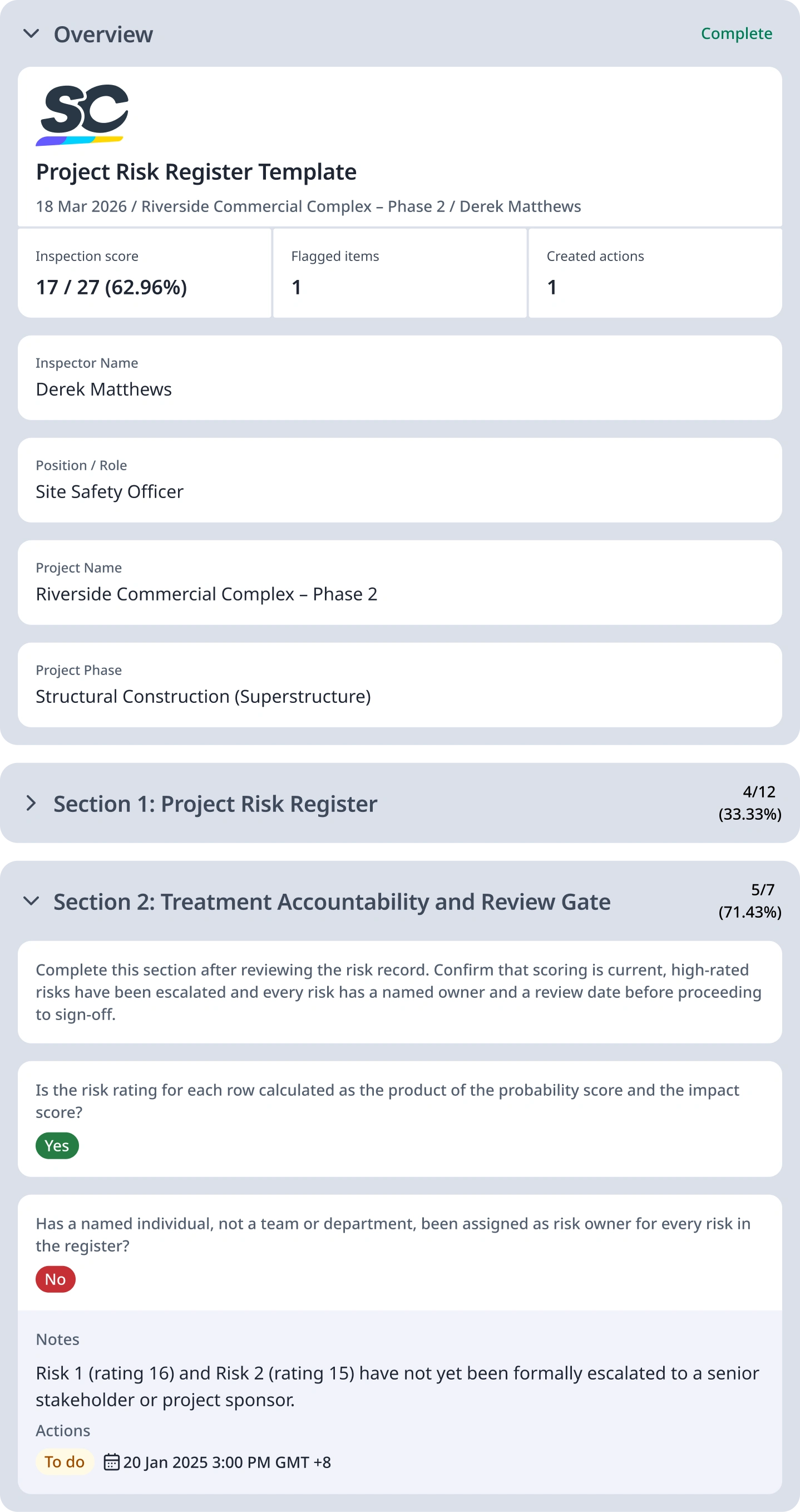
To give you a better understanding of how this template is used, here is a sample project risk register report:


Still looking for a checklist?
Search, filter, and customize 60,000+ templates across industries and use cases.