Mitti by SafetyCulture
Pricing
Log inSign up for free
  1. Home
  2. Checklist guides
  3. Operations
  1. Home
  2. Checklist guides
  3. Operations
Mitti by SafetyCulture

The way the world works

Follow us

App Store
Google Play

Product

  • Pricing
  • Book a demo
  • Product updates
  • Mitti (by SafetyCulture)

Support

  • Help center
  • Contact us
  • API developer documentation
  • Digitize your checklist

Resources

  • Content library
  • App & software guides
  • Checklist guides
  • Topic guides
  • eBooks
  • Blog

Company

  • About
  • Careers
  • News room
  • Meet the leadership team
  • Events & webinars
Copyright © 2026 Mitti
StatusLegalPrivacyTerms & ConditionsSecurity

SafetyCulture has a new name. Say hello to Mitti. Learn More.

Use template
  • What is an Asset Register Template?
  • Why Use a Template for Registering Assets
  • Types of Asset Register Templates
  • What to Include in an Asset Register Template
  • How to Create and Use This Template Effectively
  • Asset Register Example
  • FAQs About Asset Register Templates

In this article

  • What is an Asset Register Template?
  • Why Use a Template for Registering Assets
  • Types of Asset Register Templates
  • What to Include in an Asset Register Template
  • How to Create and Use This Template Effectively
  • Asset Register Example
  • FAQs About Asset Register Templates

Eliminate paperwork with digital checklists

Skip the setup and get to work in seconds.

Use template

Article by

Patricia Guevara

|

4 min read

|

28 Jul 2025

What is an Asset Register Template?

An asset register template is a tool that provides a structured format for recording asset details to monitor, track, and manage an organization’s assets effectively. This template serves as a foundation for asset-related decision-making and planning. It’s a useful tool for asset management, financial reporting, insurance purposes, and compliance with regulatory requirements.

Why Use a Template for Registering Assets

Assets are items or resources that have value and are owned or used by a certain entity, like a company, organization, or individual.

An asset register is used to record important information about these assets, such as their description, acquisition date, cost, depreciation, location, and current status. Moreover, it serves as a central repository of asset information, allowing for easy reference and retrieval of asset-related data.

Using a template for asset registers can be beneficial for organizations in the following areas:

  • Efficiency – provides a structured and organized format for recording asset information, consistent and standardized data entry, and easier ways to manage and locate asset details when needed

  • Accuracy and Consistency – helps ensure that important details about assets are accurately recorded and consistently maintained to prevent errors, discrepancies, and inconsistencies in asset data

  • Compliance and Reporting – lets organizations meet compliance requirements by facilitating the generation of reports or documentation needed for audits, financial statements, and other reporting purposes

  • Asset Management – allows organizations to track key information, such as depreciation, maintenance schedules, and disposal or replacement dates

Types of Asset Register Templates

In an organization, assets can mean anything from the tangible items it owns to information it processes and stores for business purposes. To effectively manage such, there must be unique templates dedicated to different types of asset registers, including the following:

  • Fixed asset

  • Digital asset

  • IT asset

  • Facility asset

  • Information asset

  • Hardware asset

What to Include in an Asset Register Template

Here are some common elements that can be included in an asset register template:

  • Asset Description

  • Acquisition Date

  • Cost

  • Depreciation

  • Location

  • Status

  • Responsible Party

  • Serial/Asset Number

  • Warranty/Insurance Information

  • Notes/Comments

Note that these are just some of the common fields that can be included. The template can be customized based on the organization’s specific needs and requirements. Moreover, additional fields can be supplied or existing fields modified to suit the organization’s asset management processes and practices.

How to Create and Use This Template Effectively

To help you maximize the use of an asset register template, follow these steps as you create and fill it out:

  1. Determine the purpose of the asset register template and the scope of assets that will be included. Consider the types of assets to be recorded, the level of detail required, and the specific information that needs to be captured.

  2. Enter relevant information for each asset into the appropriate fields.

  3. Double-check the data entered into the template for accuracy and consistency. Verify that all information is correctly recorded, including dates, numbers, and other details. This step is crucial to ensure the integrity of the asset register data.

  4. If the template includes fields for depreciation, regularly update the depreciation information based on the organization’s depreciation policy or methodology.

  5. Utilize the data in the asset register template to generate reports and analyze the assets. This can include financial reporting, asset utilization analysis, maintenance schedules, and other performance metrics.

  6. Keep all relevant documentation related to the assets, such as purchase invoices, warranties, maintenance records, and disposal certificates, and link them to the respective assets in the asset register template.

  7. Regularly update the asset register data and template as changes occur to the assets, such as new acquisitions, disposals, transfers, or changes in status.

  8. Conduct physical audits of assets to verify their existence and condition, and compare the data in the filled-out template with actual assets to identify any discrepancies or errors.

  9. Provide training and guidance to relevant personnel on using the template effectively and consistently.

Asset Register Example

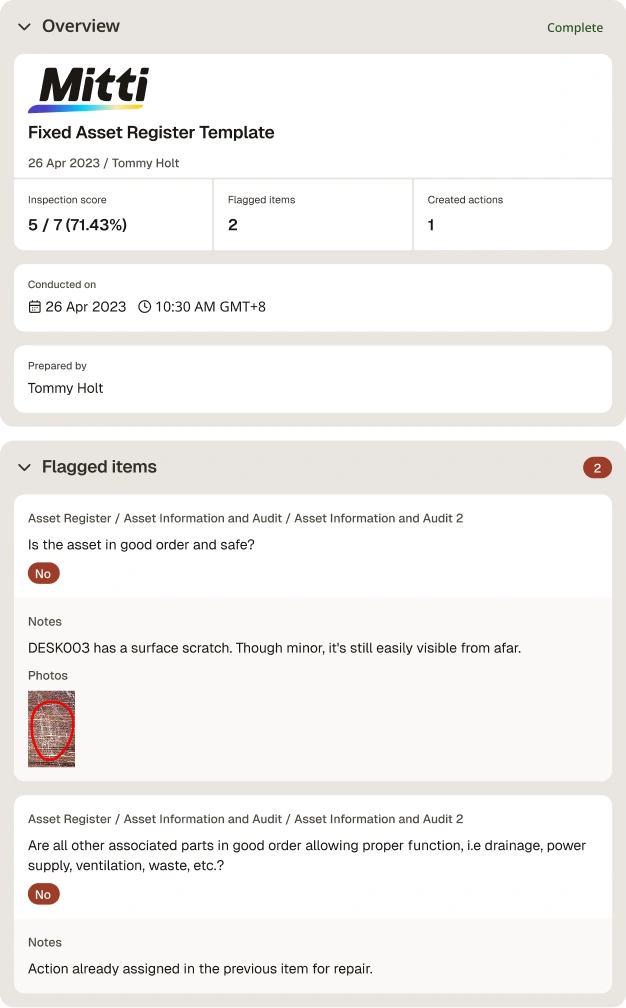
To provide a visual representation, here’s an example of a completed asset register report when performed in a digital template and exported as a PDF:

Asset Register Template Sample Report

Asset Register Template Sample Report | Mitti (by SafetyCulture)

Content library templates

Still looking for a checklist?

Search, filter, and customize 60,000+ templates across industries and use cases.

Browse Library

FAQs About Asset Register Templates

PG

Article by

Patricia Guevara

Mitti (by SafetyCulture) Content Specialist

View author profile

Powered by

Fixed Asset Register Template

Efficiently record and track assets in your organization to continuously monitor their value over time.

Rated 4.6/5 stars on Capterra | 3k+ app store reviews
Use templatePreview template
asset register template
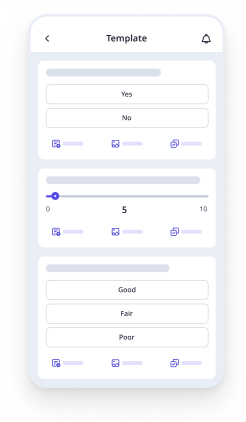
Mobile Preview
See the template in action (opens in new tab)

Download this free fixed asset register template to help you keep a record of your tangible assets, their descriptions, and unique identifiers. Apart from that, you can also do the following:

  1. Fill in the basic details of your assets, including their name, type, acquisition date, location, cost/value, and others.

  2. Capture and upload photos of assets and use the text fields to uniquely and specifically describe them.

  3. Add notes to record any defects or damage to assets for easier endorsement for repair, replacement, or maintenance.

  4. Before completing the asset register, include digital signatures to note that all corrective actions and maintenance needs, if any, are assigned and/or endorsed and that all needed assets have been recorded.

  5. Export it into an asset register template PDF, Excel, or Word file for recordkeeping and store it securely on the cloud.

asset register template
Mobile Preview
See the template in action (opens in new tab)

Why Mitti digital checklists?

  • Free to use for up to 10 users

  • Eliminate paperwork with digital checklists

  • Generate reports from completed checklists

Related resources you might like

Templates

Powered by

Information Asset Register Template

This straightforward information asset register template when recording assets, files, systems, and applications used for processing or storing personal information and other data across the organization.

View template in library

Powered by

Asset Management Template

Download this asset management template to track the important details of vital company assets and indicate the schedule of maintenance tasks for each asset. Include sign-offs of the asset owner, manager, and custodian to verify accurate and up-to-date details.

View template in library

Powered by

Fire Asset Register Template

Use this free fire asset register template to record all your organization’s fire equipment and other fire safety-related assets, such as smoke alarms and fire extinguishers. Note whether they pass or fail the minimum requirements for safety and quality purposes.

View template in library

Articles

Recreation Management Software

Explore top recreation management software to streamline operations, enhance user experience, and simplify managing recreational activities.

Learn more

Transportation and Logistics: What’s the Difference?

Learn about the importance of transport and logistics within the supply chain and how it is used in business operations.

Learn more

Focus Group Template

Get free focus group templates from Mitti (by SafetyCulture) to plan, run and report on structured group discussions digitally.

Learn more