What is an Asset Management Template?
An asset management template is a tool that establishes a framework for recording, tracking, and handling company assets. It can be used for a wide range of assets, such as equipment, vehicles, and information technology (IT) tools. Businesses can customize this template to fit their specific needs.
Benefits of Using This Template
One of the best ways to manage assets effectively is by using templates designed specifically for this purpose. But how exactly can it help your business? Below are some benefits of this template:
Increased efficiency – Instead of creating a system from scratch, asset managers can customize a pre-built template to meet their needs. This, in turn, can help them focus on other vital aspects of their business without sweating the smaller details.
Improved asset tracking – Using a template allows businesses to keep track of all their assets—their location, condition, maintenance schedule, and value—in one place. By doing so, they can make informed decisions about when to replace or repair them.
Reduced errors – Manually tracking assets can be tedious and error-prone, especially when many assets are involved. A template can significantly lower this risk, as it’s designed to capture all the asset information you’re looking for.
Types of Asset Management Templates
Asset management involves various tasks and processes, which will require templates that cater to their function. Here’s a quick overview of the common types of asset management templates:
Asset Tracking Template
An asset tracking template allows organizations to monitor their assets, including their location, status, and condition. By using this template, they can easily identify lost, stolen, or misplaced assets, perform maintenance tasks as scheduled, and decrease the risk of asset depreciation.
Asset Register Template
On the other hand, an asset register template outlines all the assets an organization owns or handles. It usually records vital asset details, including their name, description, and unique identifier (e.g., serial number). With a comprehensive repository of asset information, organizations can make informed decisions about maintenance, upgrades, and disposal.
Asset Audit Template
An asset audit template is a tool used to conduct regular audits on a wide range of assets. It allows auditors to systematically examine the organization’s asset registers for accuracy and completeness. With this tool, organizations can maintain a proper record of their assets, note improvement opportunities in their asset management practices, and comply with relevant accounting standards.
Templates for Specific Assets
Organizations can also tailor their asset management templates to the specific types of assets they’re managing, such as but not limited to:
Fixed asset management template – This template helps organizations manage their fixed assets, such as land and buildings. In this template, you can specify the purchase date, cost, depreciation schedule, and disposal date of each asset.
Physical asset management template – Also called enterprise asset management template, this document lets organizations efficiently handle their equipment, machinery, vehicles, furniture, and other physical assets.
IT asset management template – This tool covers essential information for managing hardware, software, data, and other IT assets. It maps out the asset’s purchase date, cost, warranty information, license agreements, usage history, and other details.
Digital asset management template – This template encompasses various types of digital assets, including photos, videos, audio recordings, and documents. It’s best used for media organizations, marketing agencies, and other companies that manage huge volumes of digital content.
What to Include in Your Template
Regardless of the type of asset management template you’re using, here are the essential items to include in your template:
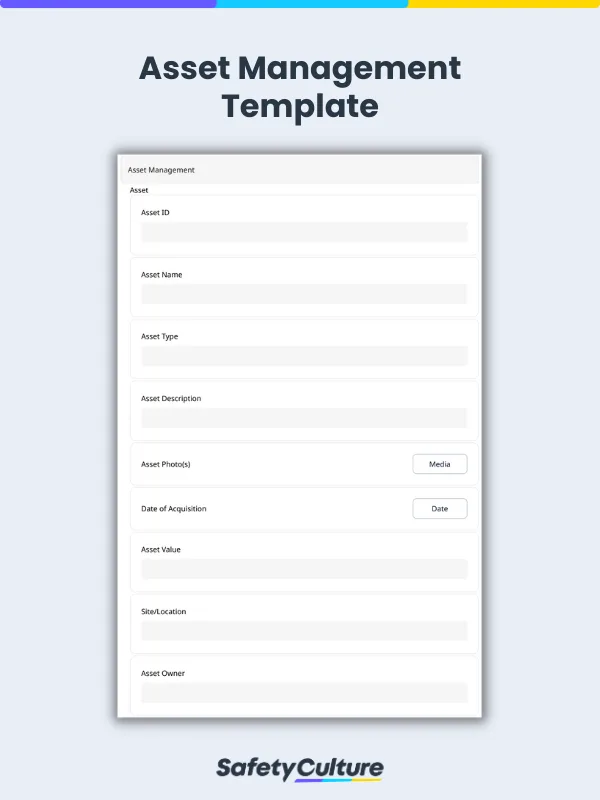
Asset identifiers – Specify the asset name, type, and unique identifier.
Description – Briefly describe the asset’s appearance, features, and functions.
Photo(s) – Attach a photo of the asset for reference.
Date of acquisition – State the date when the asset was obtained.
Current value – Note the asset’s monetary value in the present time.
Site or location – Pinpoint the facility or location in the company where the asset is placed.
Responsible person(s) – Mention the name of the asset owner and asset custodian. The former can be an individual or a department.
Asset condition – Evaluate the asset’s functionality and specify any defects found.
Date of last maintenance – Write the most recent date of maintenance for the asset.
Maintenance schedule – Outline all maintenance activities, their frequency, and the person or department in charge of that specific asset.
Here’s a sample asset management report created using a digital template:

Asset Management Template Sample PDF Report | Mitti (by SafetyCulture)

Still looking for a checklist?
Search, filter, and customize 60,000+ templates across industries and use cases.