What is an Asset Tracking Template?
An asset tracking template is a pre-designed document, database, or tool that helps organizations track the movement and status of their physical assets, such as equipment, tools, machinery, furniture, and vehicles. This template typically includes fields for recording key details to easily track and manage your assets’ locations, maintenance schedules, and usage history.
How Do You Track Assets?
As businesses grow and assets accumulate, it may become increasingly challenging for them to keep track of everything. This is where asset tracking comes in, providing a way for asset monitoring and management.
As part of the bigger asset management approach, asset tracking can be done in various ways depending on the asset type, the level of accuracy required, the budget, and the purpose of tracking. Here are some common methods:
Barcode scanning – Assets are assigned a unique barcode scanned using a barcode scanner or mobile device for faster and more accurate tracking.
Radio Frequency Identification (RFID) – This uses radio waves to identify and track assets via RFID tags attached to them and scanned by RFID readers, ideally for real-time tracking of large numbers of assets.
Global Positioning System (GPS) – This is best used in tracking assets that are constantly on the move, such as vehicles or equipment, with GPS trackers installed on them.
Asset tracking software – Using this tool can help automate the tracking process, provide real-time updates, and generate reports.
Different industries may have varying asset tracking requirements. Here are a few examples:
Transport and Logistics – track the movement and location of goods and vehicles using GPS tracking devices
Construction – manage the movement of heavy machinery and equipment, such as cranes, bulldozers, and excavators
Manufacturing – monitor the location and condition of product inventory and equipment
Retail – manage the movement of inventory and track the location of products from the warehouse to the store shelves
Healthcare – monitor the location and condition of medical equipment, such as infusion pumps, ventilators, and monitors
Why Use a Template For Tracking Assets
Using an asset tracking template offers numerous benefits for organizations that need to manage assets. Here are some of them:
Improved asset visibility – Organizations can maintain an accurate and up-to-date record of their assets, which can be used to reduce costs associated with asset maintenance and repair.
Streamlined asset management – Templates help provide a centralized location for tracking and managing assets, thus reducing errors and duplication of effort.
Better decision-making – Templates exported into insightful audit reports aid companies in making more informed decisions on optimizing asset usage.
Increased accountability – Organizations can assign responsibility for specific assets to individuals or departments, helping reduce the risk of loss or theft.
Enhanced reporting – Asset tracking templates can provide a structure for detailed reporting capabilities, which can be used to inform business decisions and demonstrate regulatory compliance.
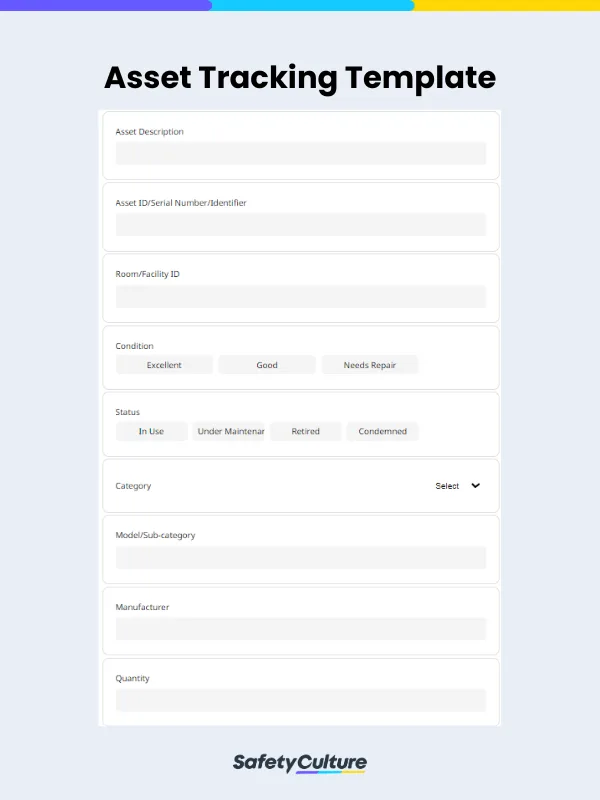
What to Include in the Template
To help ensure you’re able to record key details about your organization’s assets, an asset tracking template must contain certain fields and elements, including the following:
Asset Photo
Name and Description
Asset ID/Serial Number/Identifier
Room/Facility ID
Condition
Status
Category
Model/Sub-category
Manufacturer
Quantity
Owner
Department
Date Purchased/Acquired
Original Value/Purchase Price
Depreciation Rate
Maintenance Schedule
User History
Relevant Documentation (e.g., manufacturer’s manual, warranty information, receipts, work orders, maintenance records)
Completion and Sign-off
How to Create and Use an Asset Tracking Template
To guide you better, follow these steps on how to create an asset tracking template and leverage it in your organization:
Determine what assets to track – With this, you can start creating a master list of all the assets that your organization owns.
Include relevant information – Your asset tracking template should include all relevant information about each asset. Also, it’s a good idea to include any maintenance or service history for easier reference.
Assign unique identifiers – These may include barcodes and RFID tags to make it easier to locate and track each asset as it moves throughout the company.
Establish workflows – Set up a system on how assets will be added, removed, and moved within your company to ensure that everyone’s on the same page when tracking assets to minimize confusion and errors.
Train employees and assign responsibility – Make sure all responsible individuals are trained on how to properly use the asset tracking template and follow the workflows.
Conduct audits and update regularly – This is to verify the accuracy of the template, identify any missing or incorrect information, and keep details up-to-date.
Make informed decisions – An asset tracking sheet can help make informed decisions about asset management, maintenance, and disposal.

Asset Tracking Template Sample Report | Mitti (by SafetyCulture)

Still looking for a checklist?
Search, filter, and customize 60,000+ templates across industries and use cases.