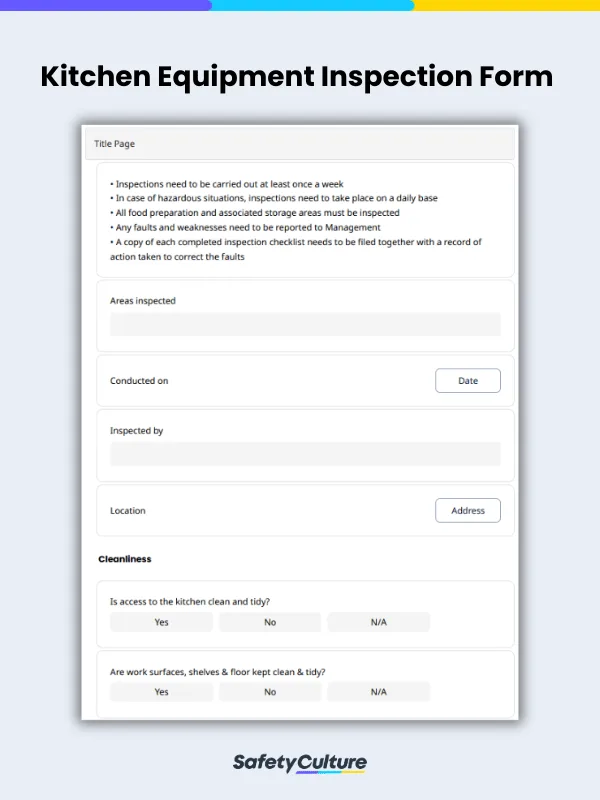
Not using an equipment inspection form wastes time, money, and resources. Thinking of what to do and how to do it each time equipment has to be inspected is ineffective. An equipment inspection form speeds up the inspection process by providing a checklist of inspection items so they aren’t missed. Missing an item during an equipment inspection has serious consequences and can lead to injuries that may require expensive medical rehabilitation. Equipment may have to be replaced due to not immediately addressing defective or deteriorating parts. Even if no accidents occur and equipment can still be used, a missed item can result in lower employee productivity and decreased operational efficiency.
All of this can be avoided by using an equipment inspection form so that all items are checked. The forms should be tailored to the business need, their existing safety rules to follow, or the current situation to ensure accuracy. More than flagging issues, it should also provide comments or appropriate corrective action to help resolve issues and prevent them from happening again.
The Health and Safety Executive and Regulation 6 of the Provision and Use of Work Equipment Regulations states that equipment should be inspected:
after installation;
after assembly at a new site;
after major modifications;
after serious damage;
after a change in nature of use; and
at suitable intervals.
How to Use an Equipment Inspection Checklist
Keeping equipment in top shape helps you perform at your best. Here are common use cases:
Kitchen Equipment Inspection: For Chefs
Cleanliness and safety are vital. Inspect hidden spots like behind the fridge and inside the oven for dust or grime. Test all equipment before use to avoid breakdowns during busy hours. Also check smoke detectors, fire alarms, and ensure fire extinguishers are nearby and functional. For heavy equipment like slicers, confirm proper assembly and safety features before use.
Retail Equipment Inspection: For Salespeople
Ensure a smooth customer experience by inspecting sales tools before opening. Test payment systems and inspect carts. Don’t overlook security—check tags on merchandise, test security systems, and address any issues promptly.
Business Equipment Inspection: For Entrepreneurs
Your team needs the right tools to succeed. Regular equipment checks keep operations smooth and employees safe. Provide a simple inspection form to empower your team to maintain safety and performance.
What to Include in an Equipment Inspection Checklist
Inspections vary by equipment type, but the following core elements ensure thorough and consistent evaluations:
Equipment identification (serial number, type, location)
Visual checks (cracks, rust, wear)
Functional checks (power, movement, calibration)
Safety features (guards, signage, emergency stops)
Maintenance history and notes
Inspector’s name, date, and signature
In this day and age, using paper checklists on clipboards is an unnecessary hassle and expense. Especially with the current emphasis on safety regulations, having a stack of pages to go through when conducting an equipment inspection is a major headache. With a digital equipment inspection form, it’s possible to sync all completed inspections and quickly assign a new one to someone else. No need to go to the other side of the room (or building) to hand over an equipment inspection form; just tap and hit send.
Equipment Inspection Software: 7 Types of Operators that Have Adopted the Technology
The world is seeing increasing growth in industrialization and urbanization. This trend is not expected to slow down soon, and by 2050, it is expected that two-thirds of the global population will live in urban and developed societies. To address this growth, the construction industry is needed more than ever to support the global demand for infrastructure.
With the help of equipment inspection software, equipment operators at construction sites have been able to ensure that their assigned equipment is in the best operational state before commencing work. To give you some examples, here are 7 types of operators that have integrated equipment inspection software into their workflow to improve their respective asset management programs:
1. Crane Operators
Crane operators use equipment inspection software as a vital job aid in following safety procedures, enforcing construction safety, and identifying equipment damage and defects before operating cranes and handling items. With the use of a mobile device, they use pre-uploaded crane inspection checklists to inspect a tower crane before, during, and after operational shifts.
2. Forklift Operators
Forklifts are crucial construction equipment that helps move things faster on a construction site. A single, inoperable forklift can significantly hamper logistics efficiency, and its downtime can be costly to the business. With the help of equipment inspection software, forklift operators can conduct efficient daily heavy equipment inspections to help reduce the likelihood of workplace injuries and deaths caused by faulty forklifts.
3. Personal Protective Equipment (PPE) Users
PPE Safety Checklists are used by site safety supervisors to help identify tasks that require PPE and ensure that their team is provided the right protective equipment at all times. Using equipment inspection software, they can assess the potential hazards inherent in their type of construction work and set standards on appropriate PPE before handing them over to workers.
4. Excavator Operator
Operators of excavators use an equipment inspection app pre-operation to evaluate the job site, utilities, and equipment, access means, area atmosphere, and support systems. This ensures that issues are identified and resolved before starting excavation and trenching. By having the ability to conduct heavy equipment inspections on a mobile device even without an internet connection.
5. Safety Harness Equipment Users
Occupational health and safety regulators around the world such as OSHA, HSE, and SafeWork require regular inspections and proper maintenance or storage of fall protection equipment. With the aid of equipment inspection software, construction sites can efficiently comply with this requirement.
6. Scaffolders
Erectors and users involved in scaffolding work must be protected through scaffolding safety inspections. Through scaffold inspections done with the equipment inspection software, scaffolders can manage and control the inherent risks of scaffolding work.
7. Heavy Vehicle Drivers
Heavy vehicles are equipment used extensively at construction sites. They must undergo regular inspections, but at the same time, these inspections also need to be done efficiently to avoid impeding operations. Ensuring that operating equipment remains as safe as possible is vital to having a successful construction project.
Equipment Inspection Report
Here’s an example of a completed equipment inspection report used in kitchen equipment:
Equipment Inspection Sample Report