Online quiz makers
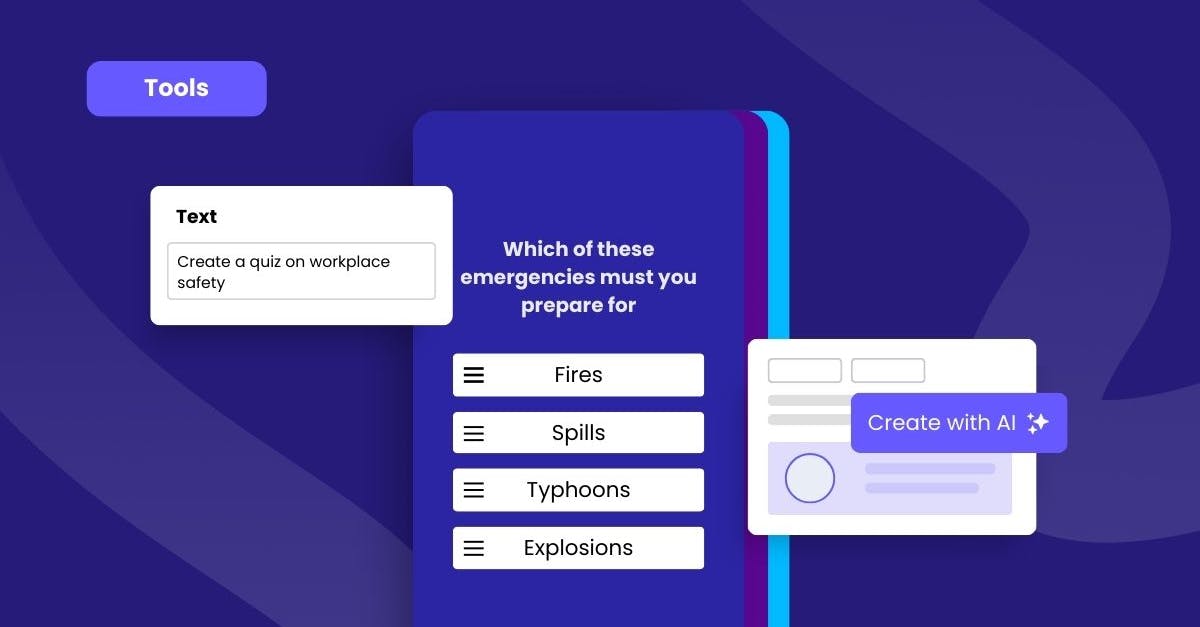


Mitti (by SafetyCulture) is a learning management system (LMS) and online quiz maker that makes learning fun and engaging for users. With this microlearning mobile app, teams are still able to catch up with their course lessons even with a busy schedule or shift work. That is why Mitti (by SafetyCulture) is the leading LMS across a number of industries, including retail, hospitality, manufacturing, and construction.
One of its features, Rapid Refresh, is a user-friendly online quiz maker designed to check your team's understanding of your training and reinforce their learning.
Questions are set up using an easy-to-complete spreadsheet and the tool will automatically transform your content into gamified assessments, which you can then deploy directly to your learners' mobile devices.
You will also have access to Mitti (by SafetyCulture)'s analytics and reporting suite, designed to help you understand any knowledge gaps your team members may have.
Apart from quizzes, you can also turn to Mitti (by SafetyCulture)'s Create with AI tool to design an entire training course for your team. You do not have to worry about researching or investing time in course design. Just hit that Create with AI button, and watch the magic unfold as your course materializes within minutes!
You can even turn on completion certificates so that when your team members finish their courses, they will automatically receive proof of learning.
Features:
Question spreadsheet template
50+ authoring and testing templates (no coding required)
Create with AI tool
Completion certificates
Automatic grading, scoring, and advanced dashboard analytics
Easy in-app branding and customization
Cloud-based translation
Diverse question templates: Multiple choice (carousel, chat simulation, circle the answer, images), games (find-a-word, jeopardy, letter jumble, true or false), and more
Mobile-first design
All device compatibility (responsive design)
Analytics and reporting suite
Quizlet is an online quiz maker for instructors to assess their learners. With its easy-to-use instructional design tools, trainers can create quality quizzes without prior experience. The platform features test templates and supports multimedia formats to develop engaging content effortlessly.
Features:
Flashcard format
Diverse question template: Multiple choice, written answer, audio button
Audio function for auditory learners and for people of all accessibility needs
Curated study sets available for different topics
SurveyMonkey allows users to create questionnaires quickly. The free basic plan is highly limited with a view-only mode of up to 40 survey responses. If you’re looking to conduct more complex quizzes, they have paid plans with advanced features that can give you more flexibility and customization options when creating training quizzes.
Features:
Easy creation of surveys, quizzes, and polls
Multiple quiz templates available
Analytics
Quiz Maker features a straightforward and intuitive interface, making it easy for you to create quizzes. It supports course customization, grading automation, and in-lesson games, which allow you to focus fully on teaching.
Features:
Different quiz types: Trivia, personality, graded, survey, polls
Customizable themes
AI generator
Outgrow’s quiz maker is an interactive marketing platform that lets digital marketers create engaging quizzes and assessments for lead generation and nurturing. It offers 1000+ templates along with robust analytics and automation features to make any plan a success. Overall, the tool is advanced but simple to use.
Features:
Layouts and Templates
Data Visualization & Segmentation
Embedding & Integration
TriviaMaker lets you use popular quiz game formats to help engage learners much more. With options like Tic-Tac-Toe, Hangman, and Spin the Wheel, your learning materials become fun and interactive, enhancing the challenge for team members.
Features:
Different quiz styles
100+ pre-made games available
Compatible with different devices
Interact is an online test maker that lets you create quizzes designed to generate leads and drive business growth. This platform is tailored for marketers who want to engage potential customers through exciting questionnaires and multiple-choice questions that enhance brand memorability.
Features:
Quiz types: Personality, scored, assessment
800+ readily available templates
Includes branding and theme customization
FreeOnlineSurveys is a free online quiz maker with tools that can speed up course authoring and increase completion rates. The platform features an AI assistant that offers instant feedback and writing recommendations. Additionally, you can set up quizzes to be automatically scrollable, creating a smoother experience for learners.
Features:
Different question types: Multiple choice, date/time, open-ended, multi-factor, ranking order, picture choice, split testing
Customizable templates and quiz samples available
Filter & segmentation, cross-tabulation
Rapid survey design assistant
ClassMarker is an online test creator software that gives you full control over the course management process. It allows you to set up permissions, analyze real-time data, and automate learner certification for added convenience.
Features:
Different types: surveys, quizzes, forms
User access available (public or private viewing)
Flexible branding customization available
Software downloads not required
Pixofun is a training tool to create quizzes in a text quiz game format. Seeing that the quizzes are gamified, the recall of knowledge is increased with their interactive approach. This way, your team members can enjoy and complete more courses, increasing organizational knowledge.
Features:
Quiz modes: games, stock-market-like structure, duel, group trivia
Pre-made templates available
Mobile use supported
ProProfs Quiz Maker comes with a massive quiz library of ready-to-use questions and over 100+ professionally-designed training assessments. It also has a reporting system complete with visual analytics, letting you configure, customize and secure your assessments.
Features:
15+ quiz question types: Multiple-choice, checkbox, video-response matching, fill-in-the-blanks, essay, etc
Editable ready-made templates and 100+ expert-designed assessments
Branding and customization available
EasyTestMaker is an online testing software that makes it easier to author and manage a variety of digital tests and quizzes. It can also export all your test questionnaires, analytics, and students’ results to PDF or Word, which is perfect if you also want to have a printed copy of your training materials.
Features:
Easy quiz creation with a variety of question formats
Export of test questionnaires
Analytics and students results to PDF or Word
With Typeform, creating clean and professional quizzes is only as easy as drag and drop. Simply choose your preferred question types, input your questions and answers, and customize them as needed. If you’re unsure where to start, the platform also offers over 400 visually appealing templates.
Features:
Drag-and-drop quiz builder tool
400+ visually appealing templates
Shareable reports and analytics
Kahoot! is an online quiz maker tool that uses colorful visuals and gamification elements to maximize engagement and ensure a higher completion rate among learners. Quizzes can be accessed via a web browser or a mobile app., and they can be presented on a shared screen for group participation.
Features:
Colorful and gamified quizzes
Host games for 3-10 players
Self-paced challenge
Google Forms is designed for creating straightforward quizzes, such as multiple choice questions, checkboxes, and drop downs. A summary report is provided instantly after each successful quiz completion, saving you time on computation and assessment.
Features:
Straightforward quiz building
Instant data result and analysis
Fyrebox is another online quiz maker tool for creating interactive and colorful online quiz programs that you can use to evaluate your employees or share with the public to generate leads on your website or social media. Here, you can easily customize the appearance of your test, move buttons and change their color, and even upload your background image.
Features:
Flexible customization of quizzes
Creative themes and templates accessible to all users
Unlimited quizzes and completions
Nearpod offers a variety of formative assessments, including multiple choice quizzes, polls, and fill-in-the-blank questions, to evaluate your employees' current skills and measure knowledge retention from their training lessons. To make your content more interactive, you can also include media, videos, or audio instructions.
Features:
Flexible customization of quizzes
Creative themes and templates accessible to all users
Unlimited quizzes and completions
PaperShala is a reliable quiz maker for students that allows you to create tests, reuse questions, and check results immediately. It also has a dedicated student dashboard where learners can check the exams they need to take, track their current progress, and assess their overall performance.
Features:
Multifunctional question bank
Student dashboard
Resume Exam feature
Mercer Mettl is a free quiz creator software that caters both to schools and businesses. It boasts of an intuitive, hassle-free dashboard that allows you to focus on building tests instead of spending time learning how to do them. It offers a wide variety of question types, such as multiple-choice, true/false, and essay questions.
Features:
Test authoring
Complex skills testing
Different question types
The Articulate Quizmaker 360 is an employee training tool that you can use to author quizzes, surveys, and other assessments. Its content library features content templates that can help you create ideal decision-making scenarios and tests for more challenging courses. The quiz maker tool’s responsive player adapts to different screen sizes and devices.
Features:
Content library
Responsive design that supports touch screen gestures
Review and annotation options
If you want to turn your online quiz into something more fun and engaging, Xperiencify is a good place to start. It houses an array of tools that can help you create quizzes in game format. But what makes it unique is that it can give you flexibility to customize your quizzes in a way that will motivate your learners into taking and completing your training initiative.
Features:
Game-based quiz creator
Leaderboard and badges
Reward system
Quiz timer
With FlexiQuiz, you can create, publish, and analyze online tests effortlessly. This powerful quiz authoring software is for individuals, teachers, and businesses who want to provide their learners with a fun and engaging learning experience. All the features are easy to use and require no coding or design experience.
Features:
Multiple questions formats and templates
Ability to add multimedia files
HubSpot CRM is an all-in-one tool that offers various marketing, sales, and service tools that help you engage with your users while tracking their progress and experience with your platform. For quizzes, you can create dozens of examples using their Marketing Forms and embed them into different emails, websites, blogs, and more.
Features:
Drag and drop functionality with dozens of field options
Diverse question templates: multiple choice, fill-in-the-blank, written answers, etc.
Sync and connection to marketing, sales, service, and website platform
Automation and data storage functionality
Zonka Feedback is an online quiz & survey builder that lets you create surveys and questionnaires in minutes. You can create quizzes for students, employee engagement, market research, brand awareness, and more using this survey software.
Features:
Easy-to-use survey builder for quick creation of quizzes and surveys
Multiple survey question types: multiple choice, checkbox, radio buttons, drop-down, etc
Real-time reports and advanced analytics
Not only can online quiz makers help you develop quizzes and training tests with ease, but they can also help you assess how much your employees have learned and what you need to improve in your existing training programs. In this article, we’ll look at the best quiz makers in the market and explore some of their best features.
Online quiz makers are accessible learning tools you can use to build training tests with a wide range of multimedia customizations. Quiz makers are usually easy to use from adding questions to course delivery, it should be as simple as clicking a button. Because tests and knowledge checks are so important to the training process, quiz makers are better when they're integrated into a learning system. Most modern learning management systems (LMS) have quiz-making capabilities integrated into their content creation software.
Now that we know what quiz makers are, here are some immediate benefits of adapting online quiz makers into your training workflow:
Save costs: Free quiz makers will not only cut costs but also save time. The quiz makers on this list don't need any special design or education expertise to build effective quizzes for all kinds of training. No need to spend on professionally built courses or resource people.
Simplify content creation: Ideation and content creation can be time-consuming. Quizzes will ensure that your teams are learning and are compliant with training. With quiz makers, you don't have to worry about the assessment stage of training. With quiz makers, you can simplify tests while making them engaging.
Engage learners: Learners who interact with training are more likely to engage and finish required training. The online quiz makers on this list go the extra step to make sure that learners are engaged with the learning materials through exciting gamified quizzes.
Online quiz makers can boost the impact of your learning initiatives. Let’s explore the value of these platforms one by one:
Enhanced learner motivation: The best online quiz makers deliver interactive learning experiences, like gamification and multimedia lessons, making training enjoyable and memorable.
Higher training completion rates: Quiz platforms improve course accessibility through their on-demand format. Because of this, more team members can complete quizzes at their own pace.
Personalized learning experiences: Using customization and assignments, quiz authoring tools help you develop learning materials that are relevant to your learners.
Immediate feedback and data analytics: Instant data collection by quiz websites allows you to quickly identify knowledge gaps, training weaknesses, and lesson effectiveness.
Reduced administrative tasks: With various automation tools and AI generators available, you can spend less time manually creating, managing, and tracking quizzes.
SC Training offers everything you need to create effective quizzes and transformative training for your teams. With flexible solutions for AI assistance, data reporting, and learner engagement, training becomes highly relevant across the organization.